
Pictures displayed on a digital screen like a monitor or are simply in digital form are made up of thousands of tiny dots also known as pixels.
The word ‘pixel’ means ‘picture element’ indicating one single dot. In coloured images, pixels of different colors are arranged alongside each other to represent different shades of colors. This means that every digitized image is broken up into tiny blocks with a description of a color value at each point. Figure 6.10 shows a pixelated black and white image of an army officer.
Future of CV: Computer vision applications are growing at a very fast pace. Corporate giants like Google, Facebook, Apple and Microsoft are investing huge amounts in computer vision.
In a coloured image, each square, or pixel stores the value of just one of the three prime colours of red, green and blue (RGB).
As seen in Fig. 6.10, an image viewed on a screen is made up of pixels. Each pixel comprises three strips of red, green and blue. The intensity of these strips is changed to represent a colour. To be more specific, each pixel contains a series of numbers or digits, hence the term ‘digital’. These numbers dictate the colour values seen. However, when we see an image, we do not see these digits, we just see the colour that they represent.
Like RGB, CMYK is an image format that stores four values for each pixel. The pixel stores values of cyan, magenta, yellow, black.
Figure 6.10 shows the digits stored in each pixel in a black and white image as well as in a coloured image. The black-and-white image stores a ‘0’ for a black pixel and a ‘1’ for white pixel. This is known as a ‘bitmap’ image as it only requires one bit of information, 0 or 1, to describe the colour. But such a representation can be used with only two tones: black and white. Not even shades of grey can be represented using a bitmap. To represent more colours (grey shades), we usually use greyscale images that use a number from 0–255 to indicate the specific colour. A greyscale image can represent total 256 different colours.
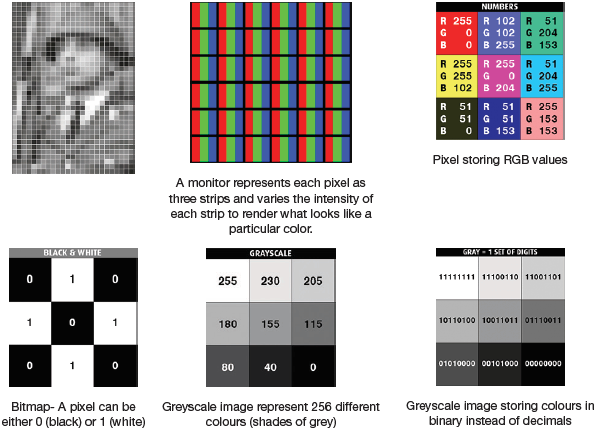
FIGURE 6.10 An Image is a composed of pixels
6.9.1 What is Resolution?
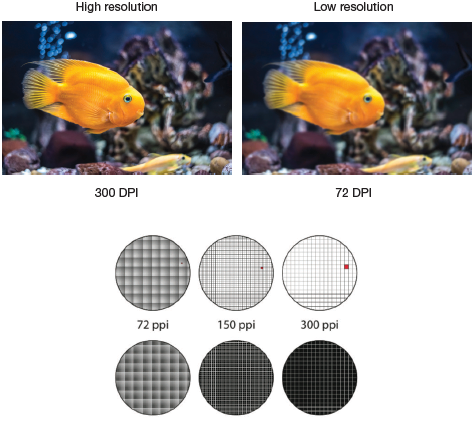
Resolution refers to the detail that an image holds. Higher the resolution, the more details the image stores and vice versa. More details mean better picture clarity. Correspondingly, less details mean less clarity. Image resolution is often measured in Dots Per Inch (DPI) and Pixels Per Inch (PPI).
There are two conventions of specifying resolution. The first convention express resolution as the number of pixels in the width (a horizontal row) X number of pixels in height (a vertical column) of the screen. That is, if we say the resolution of the computer monitor is 1280 X 1024, there are 1280 pixels in a row from left-to-right and 1024 pixels from top to bottom.
The second convention expresses the number of pixels as a single number, like a 5 mega pixel camera which means a camera having 5 million pixels (mega means millions). In our previous example, we had 1280 X 1024 = 1,310,720, or 1.31 megapixels.
Don’t get confused between image size and image resolution. Image size is the dimension specified in length and width of an image. It is usually measured in pixels (px). But image resolution, or dpi, is the number of dots per square inch of an image when it is printed. While image size specifies how large the image will be viewed on monitors, resolution reflects printer quality.
6.9.2 DPI and PPI
DPI refers to the number of dots per inch on a printed image, whereas PPI refers to number of pixels per inch in a digital image. So, technically, it’s PPI in a soft copy and DPI in a hardcopy of the image. A 300 PPI image will also be a 300 DPI image. Both the units refer to the number of units within a square inch of an image.
Credit: ZinaidaSopina / Shutterstock
FIGURE 6.11 Quality of an image depends on DPI
Figure 6.11 clarifies that we see a pixel in greater detail when we have a greater number of pixels in an inch.
Leave a Reply