
To solve a problem in Prolog, we need not specify the following three things:
- Facts: A fact is a predicate that is true, for example, if we say, “Tom is a dog”.
- Rules: A rule contains facts that has conditional clauses. To satisfy a rule these conditions should be satisfied. For example, if there is a rule, grandfather(X, Y):- father(X, Z), parent(Z, Y).This means that X is the grandfather of Y if Z is a parent of Y and X is the father of Z.
- Questions: To run a Prolog program, we need some questions that are answered using the given facts and rules.
Applications of Prolog
Prolog is used in different areas to automate several tasks including,
- Intelligent database retrieval
- Natural language understanding
- Specification language
- Machine learning
- Robot planning
- Automation system
- Problem solving
Installing Prolog
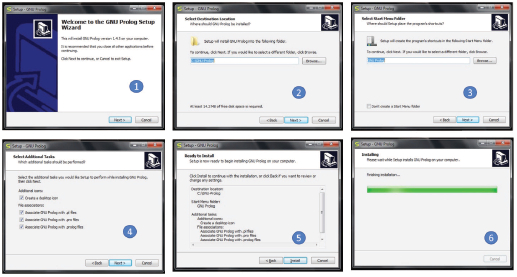
In this section, we have used GNU Prolog version 1.5. You can download it from the official GNU Prolog website, http://www.gprolog.org/ or you can straight away go the download link for Windows by using the link, http://www.gprolog.org/setup-gprolog-1.4.5-mingw-x64.exe(64 Bit System).
On clicking this link, you will get some dialog boxes, just press NEXT buttons and FINISH button at the end. Prolog will be installed in your computer.
Credit: Copyright (C) 1999-2021 Daniel Diaz
Hello World Program
Let’s write the first program to print Hello World in Prolog.
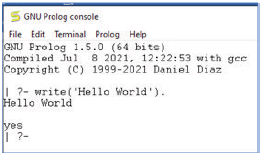
Start the GNU Prolog and write the command as follows:
Credit: Copyright (C) 1999-2021 Daniel Diaz
write(‘Hello World’)
Note that after each line, put one period (.) symbol to show that the line has ended.
The corresponding output will be as shown in figure.
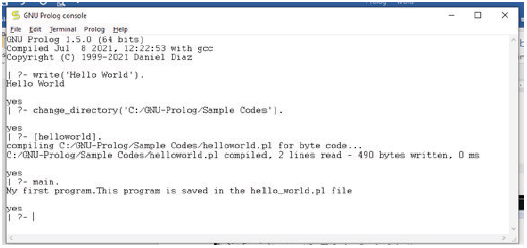
We can put these instructions in a file by writing the instruction(s) in a file and then saving it with a .pl extension. However, before executing the .pl file, make sure that either this file is stored in the directory where the GNU Prolog console is pointing or the directory should be changed to do so. To change the directory, follow the steps given below.
Step 1: From the Prolog console, go to File -> Change Dir, then click on that menu.
Step 2: Select the proper folder and press OK.
Once this is done, write the following instructions a .pl file and run the file in Prolog console as shown below.
main:- write(‘My first program.’),
write(‘This program is saved in the hello_world.pl file’).
We have saved the file as helloworld.pl in SampleCodes directory. We had created this directory in C:\GNU-Prolog directory. Note that we had changed the directory and also remember that filenames should be in small case.
Leave a Reply