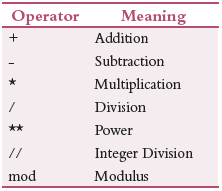
Arithmetic operators are used to perform arithmetic operations. Some popularly used arithmetic operators are given in Table. To implement these operators, create a new file and save it as ao.pl. Write the following code in it.
calc :- X is 10 + 20, write(‘10 + 20 is ‘),write(X),nl,
Y is 30 – 15, write(‘30 – 15 is ‘),write(Y),nl,
Z is 10
5, write(‘10
A is 200 / 40, write(‘200 / 40 is ‘),write(A),nl,
B is 250 // 17, write(‘250 // 17 is ‘),write(B),nl,
C is 50
D is 220 mod 40, write(‘220 mod 40 is ‘),write(D),nl.
Now, run this code in the console as shown below. Note that nl means new line.
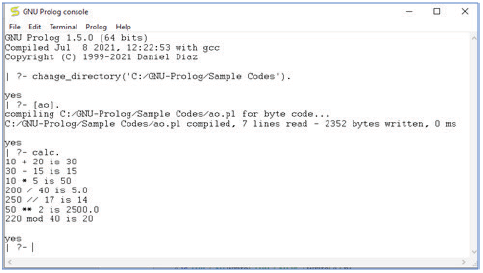
Credit: Copyright (C) 1999-2021 Daniel Diaz
Loops
Loop statements are used to execute one or more instructions multiple times. A set of instructions is executed in Prolog multiple times using recursive predicate logic. Unlike, C, C++, Java, there are no direct loops in Prolog. To simulate loop in Prolog, create a file count10.pl, write the instructions given below and execute it as shown below.
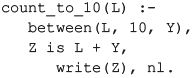
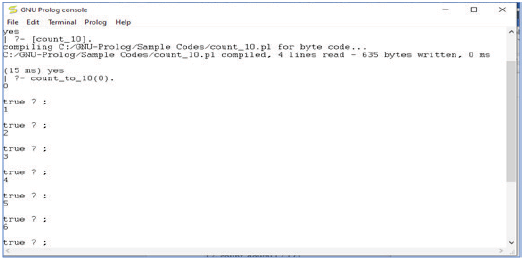
Credit: Copyright (C) 1999-2021 Daniel Diaz
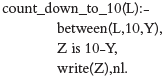
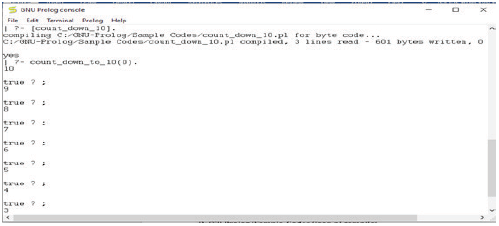
Let us write another program to count down from 10 to 0. Create a new file, write the instructions given below and save it as count_down_10.pl.
Execute the file as shown below.
Leave a Reply