
Till now, we have executed queries on the console. But many-a-times, it is necessary to some information from the user, process it and then display the result on the console. For such applications, we must know how to perform input-output operations in Prolog.
The write() Predicate
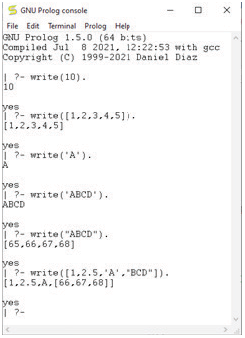
As the name suggests, the write() predicate takes the parameter as input, and writes the content into the console (by default). The content can also be written in files. Look at figure which demonstrates the usage of write() predicate.
Note that we can insert a new line in the output displayed by writing ’nl’. From the figure, it is clear that to print a string on the console, we have to use single quotes (‘string’). If we use double quote (“string”), then it will return a list of ASCII values.
The read() Predicate
The read() predicate is used to read some information from the user through the console. Users can type some content in the console, that can be taken as input and further processed. However, it is not mandatory that Prolog programs can read only from console. The programs can also read data from files.
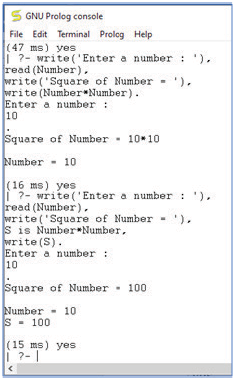
Figure shows a simple program that reads a number from the user and displays it square.
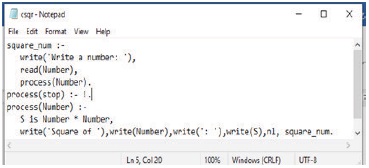
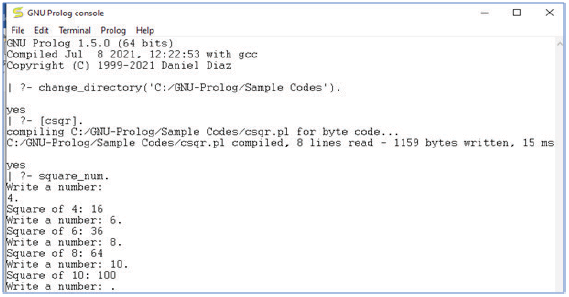
In Figure, we have extended this functionality by writing a program in a .pl file and then executing it in console. The program keeps reading number from user and displays its square until the user enters a ‘.’ (full stop).
The tab() Predicate
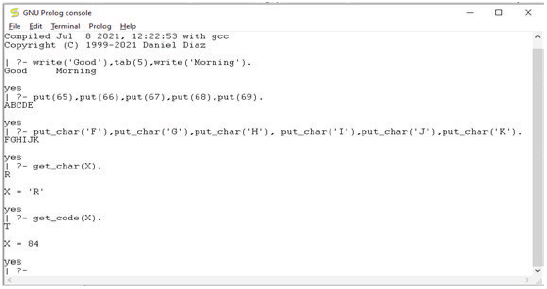
The tab() predicate is used to put some blank-spaces while we displaying some content. The predicate takes a number as an argument and prints those many numbers of blank spaces. For example, to print 5 blank spaces between Good and Morning write the following lines.

We can open more than one file using tell(). When told is called, all files will be closed.
Reading/Writing Files
Prolog has some built-in predicates, that can be used to read from file and write into it. In this section, we will read about them.
The tell and told
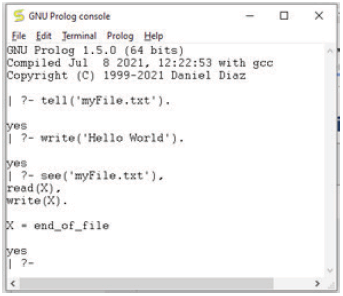
The tell() predicate is used to write data into a file and not the console. For this, it accepts filename as the argument. If that file is not present, then a new file is created data is written into it. If the file already exists, it will be opened for writing. A file once opened using tell() will remain opened until we use the told() predicate.
The see and seen
Like tell() and told(), Prolog has see() and seen() predicates that are used for reading information from file and not from the keyboard. The see() predicate therefore help us to change the current input stream. It takes the filename as input. Once the file is read and the read operation is completed, we will use seen() predicate. The seen() command transfers the control to the console again to allow accepting input from the console.
Credit: Copyright (C) 1999-2021 Daniel Diaz
The put(C) and put_char(C) Predicates
The put(C) predicate is used to write a character, C at a time in the current output stream which can be either a file or the console.
The put_char(C) function does the same work but instead of accepting a character, it takes an ASCII code as an input.
The get_char(C) and get_code(C) Predicates
Like put() and put_char(), we have get_char() and get_code() predicates in Prolog. As indicated by the name, get_char() reads a single character from the current input stream and the get_code(C) is used to return the ASCII value of the character, C.
Leave a Reply