
Typically, user experience is confused with usability while both of them are different. Let us look at some key differences below.
- Usability is about task-based interactions. It is the ability to easily execute process and transitions on the web with certain ease, while user experience is related to the experiential elements felt by a user when they interact with the website.
- Usability makes a task easy and intuitive, while user experience makes it meaningful and valuable.
- Usability involves reducing steps and roadblocks, while user experience aims at creating an emotional connection. At the most basic level, thus, usability relates to what users do and how they accomplish it, while user experience deals with what users feel about their involvement.
Elements of User Experience
To help develop a clear understanding of the elements of user experience which influence a visitor’s interaction with a website, Jesse James Garrett has shared Fig. 7.3 showing five planes as the key elements viewed in an integrated fashion. Let us study each of them below.
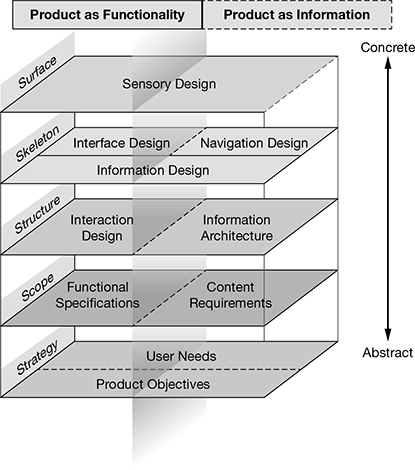
Figure 7.3 Elements of User Experience
To provide a context to Fig. 7.3, Jesse begins with a basic duality that the web began as a place where information could be created and shared, but as technologies advanced, the web started taking on new functional capabilities. So, the whole exercise of web development can be split across five key planes (strategy, scope, structure, skeleton, and surface) to help both designers and developers identify the unique tasks they need to execute at each layer and make the web development exercise is successful.
To understand each of the five planes better, let us study them briefly. We would begin with the strategy plane and move upwards to the surface plane for sequential explanation.
- Strategy: It involves understanding user needs and externally derived goals for the site. These needs are typically identified through user research, ethno/techno/psychographics, etc. For this plane, the site objective should be to come up with business, creative, or other internally derived goals for the site.
- Scope: It involves defining the content requirement at the information side and functional specifications on the functionality side. This plane helps develop detailed descriptions of functionality and type of content that the site must include in order to meet user needs. It is not necessary that the identified functionalities or content pieces which have been opted out are finally included as there are multiple other considerations in play.
- Structure: Once the scope has been developed, developers need to provide a structure to the development process which is termed as ‘Information Architecture’ on the information side and ‘Interaction Design’ on the functionality side.Information architecture: As discussed earlier in the chapter, information architecture involves structural design of the information space to facilitate intuitive access to content.Interaction design: It involves development of application flows to facilitate user tasks, defining how the user interacts with site functionality.
- Skeleton: The skeleton of the site involves placement of buttons, controls, photos, and blocks of text. A skeleton helps optimize site elements so that users can remember the site structure and navigation points effectively. Key elements of the skeleton plane on both sides includes:Navigation design: It involves design of interface elements to facilitate user’s movement through the information architecture.Interface design: It includes design of interface elements to facilitate user interaction with functionality.Information design: It refers to designing the presentation of information to facilitate understanding.
- Surface: The major concern of a web developer for this plane is to provide sensory experience created primarily through an interaction with the finished product, which, in this case, could be interactive or non-interactive text and images on multiple web pages across the site. The elements of visual design for information and functionality include: Visual design for information: It involves visual treatment of text, graphic page elements, and navigational components.Visual design for functionality: It includes graphical treatment of interface elements (also ‘look and feel’)
With an understanding of all the five planes, we can see how user experience can be designed in a structured manner for both information and functional elements which should ideally go hand-in-hand to provide the best visual and interactive experience to a web visitor.
Leave a Reply