
To understand the building blocks of a search campaign, let us take a fictitious example of a watch reseller company XYZ which wants to launch an online watch portal by the name ‘Xqui-site’ to sell global watch brands to buyers across Indian metros. We will build the case by looking at the key aspects and decisions which the newly hired marketing manager of XYZ Digital will have to take to set up a search campaign and the parameters which need to be defined to make the launch successful.
Let us assume the marketing manager has already done all the research with regards to pre-panning of campaign launch, as mentioned in the last section, We will explain below in a sequential manner, the key concepts which he needs to know to successfully set up the campaign:
- Understanding keywords: The most basic concept we need to start with is that of ‘keywords’ which are core to any search marketing campaign. A keyword is typically confused and considered to be the same as a search query.A keyword is an abstraction of multiple search queries which has been developed to support SEM bidding, while a search query is the actual set of words and phrases which any user types into the search box. During SEM what the XYZ marketer would typically bid on would be a keyword and not the actual search query. For example, if the marketing manager bids on a broad keyword like ‘Watches’, his ad would be served on multiple combinations of search queries related to that keyword including ‘Premium watches,’‘Watches for gifting,’ ‘Watch buying websites,’ etc.
- Campaign and ad groups: The next important concept which the marketing manager needs to know is how the target keywords are grouped under ‘campaigns and ad groups.’ The word ‘campaign’ has a specific meaning when we refer to AdWords search marketing. To understand what campaigns and ad groups mean, we would go back to the example of Xquisite watch portal launch. During the set-up stage, the manager will first create an account in Google AdWords search marketing tool and divide his marketing activities by grouping target keywords into logical Ad Groups, which in turn form a part of multiple types of campaigns which XYZ would want to run. So the basic set-up of an AdWords campaign involves deciding the overall marketing objectives, converting them into logical campaigns (based on service lines or products or themes, etc.), and creating multiple ad groups within each of them (which contain identified keywords).
Figure 8.2 demonstrates the relationship between campaigns, ad groups, and keywords. As represented in Fig. 8.2, a particular campaign contains ad groups and for each specific ad group, target keywords are chosen to execute search marketing campaigns. Let us first look at the definition of campaign and ad groups.
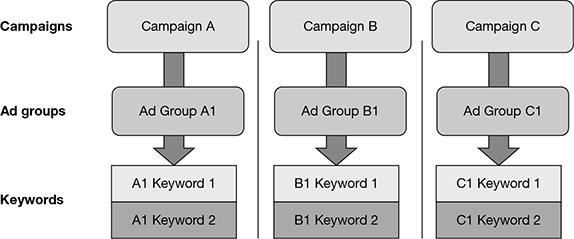
Figure 8.2 Relationship between Campaigns, Ad Groups, and Keywords
The definition of a campaign while setting up an AdWords account involves dividing the online marketing effort based on key business groups, service lines, or products, depending upon how best a company wants to focus and measure their campaigns. In case of XYZ firm, launching Xquisite online watch portal, the different ways in which XYZ can develop its campaigns could be based on:
- Watch pricing: premium watches, standard watches, budget watches
- Make types: gold watches, titanium watches, steel watches, etc.
- Target markets: men’s watches, ladies’ watches, teens’ watches
- Geography: US watches, Europe watches, Swiss watches, Indian watches
There could be many other different ways in which the firm XYZ can develop their high-level campaigns. Their selection of campaign should be based on the type which best represents how campaign investment and performance impact can be measured.
Next, we look at the definition of ad groups. Ad groups represent sub-groupings of ads which are run for each chosen campaign with each group containing a set of keywords chosen to execute the campaign. Well-structured campaigns typically contain two–three ad groups which basically are variations of the core campaign. To understand better how campaigns, ad groups, and keywords relate to each other, let us apply these concepts to the example of Xquisite portal launch.
Figure 8.3 is an example showing campaigns and related ad groups for Xquisite portal launch, based on pricing classification types—premium, standard, and budget. For each of these three campaign types, related ad groups have been shown including make types like gold, steel, and plastic. Campaigns are typically structured in such a way that their associated ad groups and related keywords have a consistent theme and support each other towards meeting the overall campaign objectives of the brand.
In this particular case, the Xquisite portal, typically, will have all three kinds of watches (based on pricing): premium, standard, and budget, which they would want to market using a separate set of keywords, text ads, and landing pages. Further, premium watches campaign can include ad groups with a mix of price type (premium watches) and the type of make (gold watches), so that it targets queries not only corresponding to buyers looking for premium watches but also those which are looking for other keywords like gold, platinum, palladium, etc., which also indicate an intent to buy brands which are of a premium make. Similar examples have also been showcased for other two campaign types—standard watches and budget watches. The next step involves developing a list of specific keywords which relate most to the chosen ad groups and would help achieve the objective of XYZ to specifically bid for them.
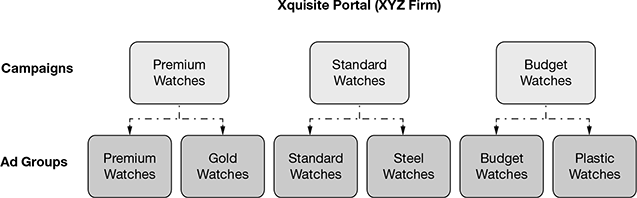
Figure 8.3 Campaign and Ad Groups Set-up for Xquisite Portal
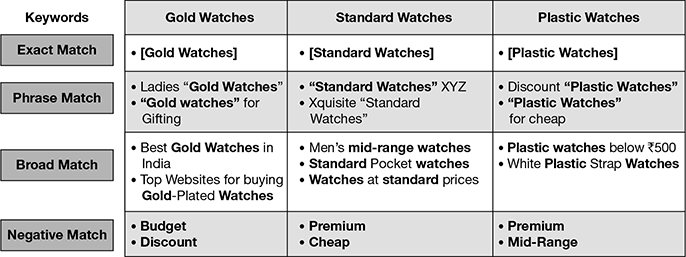
Figure 8.4 Classification of Keyword Types for Xquisite Portal
Figure 8.4 shows how keywords are developed for ad groups. We have taken examples of three ad groups out of the six showcased in Fig. 8.3 (two of them based on watch type—‘gold watches’ and ‘plastic watches’ and the third based on pricing—‘standard watches’). The four basic classifications of keywords are explained in Fig. 8.4.
- Exact match: If an advertiser chooses exact match, the keyword will display the ad only if the search term includes the exact keywords in the specific order. For example, in Fig. 8.4, if an advertiser sets the keyword [Gold Watches], an ad will be shown only if someone types the same, word by word, otherwise not. An exact match keyword is represented by [brackets] for easy reference.
- Phrase match: The next level of extension to exact match is phrase match, where an ad is displayed when the search query includes the exact phrase and other words are included before or after the phrase. Multiple examples shared in Fig. 8.4 include additional words like “Ladies,” “For Gifting” added to the phrase “Gold Watches.” An example of a query which will not be matched to this keyword would be gold-plated watches. Phrase match is represented by “inverted commas.”
- Broad match: This is the default keyword match type where an ad is matched against all possible types of queries using the given keywords. The ad will show up not only in situations of different combinations but also for other variations such as singular/plural forms, synonyms, misspellings, related searches, etc. As shared in multiple instances, in Fig. 8.4, a broad match can include all types of possible combinations including:
- Multiple words before and after phrase—Best gold watches in India
- Words inserted between a phrase—Top websites for buying gold-plated watches
- Synonyms of one of the words in a phrase—Men’s mid-range watches
- Different combinations of a phrase—Watches at standard prices
- Negative match: This option helps an advertiser select a word or a phrase for which it wants its ad to be shown when that is typed as a search term. Such words are known as negative match keywords. In the example for “Gold Watches,” words like budget and discount have been chosen as negative match keywords, which means if a search term like “Budget Gold Watches” or “Discount Gold Watches” is searched, the ad.
- Ad creation: Once campaigns and ad groups have been created and keywords have been chosen for each ad group, the next step would involve developing ads for each ad group which represents multiple keywords. An ad group typically contains keywords, ads, and landing pages (the concept of landing page is explained next). For Google Ad Words, a single ad group may contains up to 50 text ads and up to 5,000 keywords. A campaign can be as extensive to contain up to 20,000 ad groups.The text of an ad is important as it helps to attract potential customers. In the present case of Xquisite Watch Portal, the ad text should be compelling enough to get potential buyers to click on it and reach the portal for browsing, selection, and buying to happen. A text ad should contain three parts—
- Headline, which is 25 characters at the mostURL, a 35 character URL, which acts as the landing pageDescription of the specific offer within 35 characters and two lines
- Headline: The best headlines are directly related to the keywords being searched, so it always benefits if one of the keywords is part of the headline.URL: There are typically two types of URLs—display and destination URL. The display URL is the one which is seen in the ad (like in this case it is www.Xquisite.in/GoldWatches), while the destination URL is actually where the ad takes the visitor once he/she clicks on it which could be different from both the display URL and the homepage of the Xquisite Portal. The most ideal destination URL would be the one which relates best to the exact product and service the visitor is searching.Description: The best way to create description text is to list the product/service for which the ad is being created, add a key benefit, and develop a strong call-to-action, which, in this example, involves getting a 10 per cent discount on all first buys of gold watches.
 Figure 8.5 Classification of a Text Ad Example for Xquisite Portal
 - Landing page: As discussed earlier, an ad group apart from keywords and ads also needs to have specific landing pages, where users who click an ad would be made to land to engage and complete a transaction. Please refer to Chapter 7, section titled, ‘Setting up for Conversion: from Web in Page to Landing Page,’ where we have already discussed in detail the definition and basic concepts of a landing page.
- Click-through rate: The next key concept to understand is the click-through-rate or CTR (discussed earlier in Chapter 6, section titled, ‘Understanding Digital Media Planning Terminology’), which is the prime barometer for a successful adwords campaign and measures the number of clicks received on a particular ad divided by the number of times it was served (impressions) for related searches. CTR is generally expressed as a percentage: CTR% = (Total Clicks/Total Impressions) × 100As an example, if the total clicks on an ad are 15 out of a total of 1000 impressions, then the CTR is calculated as: CTR = 15 × 100/1000 = 1.5%CTR is important as it not only lets the advertiser but also Google know which of the advertiser’s ads are doing well and are more competitive than others. As we shall see later, this also goes in as one of the inputs to ‘Quality Score’ which helps Google rank the ad to determine the final price when the ad goes into an auctioning process. Advertisers on their side should also note that a higher CTR is always good for business. If the keyword set for an ad is not right for its business, then the advertiser might be spending a lot paying for ad clicks which would not yield any new sales or leads.
- Quality Score: One of the most important concepts in Adwords—‘Quality Score’—is an estimate of the overall quality and relevance of ads and related keywords. The importance of Quality Score is high as it is the prime determinant of the CPC (Cost-Per-Click), which the advertiser pays for his ads and the Ad Rank in the auction process (which we would cover a bit later).Quality Score is developed by Google using multiple pre-defined parameters which are revised regularly. The key ones include:
- Expected CTR
- Keyword relevance
- Landing page quality and experience
- Ad relevance
- Historical ad words account performance
- Campaign bid and Ad Rank: Campaign bid, also generally referred to as the CPC (Cost-per-Click) for the ad, is the amount an advertiser needs to spend to obtain a position higher to his next competitor on the search page where ads are shown. For determining the final CPC which the advertiser pays in the Google AdWords bidding process, Google has developed a concept known as AdRank. The concept involves ranking an ad each time it goes up for bidding, depending upon its Quality Score (in comparison to advertisers bidding for same keywords) and the CPC bid (which the advertiser is willing to place). The basic formula for AdRank calculation thus is: AdRank = Campaign Bid × Quality ScoreTo understand the concepts of AdRank better, we would take a hypothetical example of the “Gold Watches” ad for Xquisite Portal to see how the campaign bid and Quality Score impact its Ad Rank and finally, the ad position on the Google search page. In this example, Xquisite’s ad is being pitched for the same keywords by four other advertisers by the names Advertiser A, B, C, and D. The key task for Xquisite is to have its ad ranked above the competitors to emerge at the top in terms of ad position on the Google page so that more visitors are able to view and potentially click it, since it is placed higher up than competition.
We look at a scenario wherein competitors have different Quality Scores and bids and Xquisite needs to take a call on how much it needs to spend to trump competition.
In Fig. 8.6, the Google auction process will first look at the Quality Score of each of the five advertisers (including Xquisite). As we can see, Advertiser C and B are higher on quality rank than Xquisite, which is placed third in this aspect. Google will also look at the bids which each of them has placed for their ad. In this case too, we see that Xquisite is in the middle with a bid of 3 dollars, while Advertiser D and A are higher at $ 5 and $ 4, respectively.
Now, as Google calculates the Ad Rank by multiplying each advertiser’s Quality Score with their bids, we see that Xquisite, though it was not at top either in terms of Quality Score or bid, now, with an overall score of 24, it has the top Ad Rank which actually matters to Google while it is assigning an ad position to the advertisers. So as we can see in Fig. 8.6, that Xquisitie manages to get the first ad position in Google SEM results on the particular page for those specific set of keywords, primarily because of its relatively high Quality Score of 8 out of 10, even though its bid was just in the middle range.
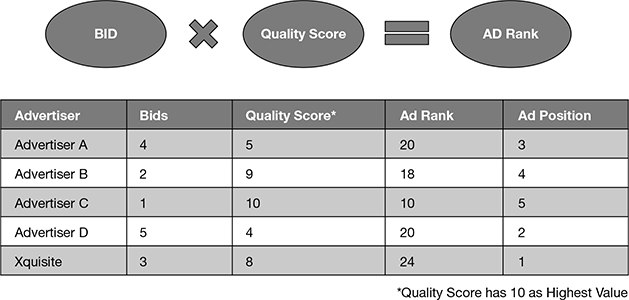
Figure 8.6 Quality Score Calculation for Xquisite vs Competition
Once the Google bidding process is over, we would assume that Xquisite will have to shell out $ 3 for which it had bid. However, Google will actually ask the advertiser to only pay a cent above the bid of the nearest competitor which it beat, which according to the calculation below, will come out to be $ 2.51 (20/8 + 0.01) instead of $ 3.
Final CPC for Xquisite = Ad Rank of Competitor Below/Xquisite’s Quality Score + $ 0.01
Thus, we see how Google encourages a high Quality Score for ads and rewards high Ad Rank advertisers with a higher ad position and lower CPC if it is creating the best ads, having the highest quality landing pages, and ensuring top quality on all other Quality Score parameters.
Leave a Reply