Mobile advertising is one of the most straight forward mobile marketing channels for people who are new to mobile because the basic concept does not change much between mobile and traditional variations of the channel. In mobile advertising, you purchase different types of ads like banners, text ads, or sponsorships, and you pay for either the number of views or impressions that the ads get, or the number of interactions that the ad gets, which could be based on clicks, form completions, or conversions or purchases.
There are a variety of mobile advertising options that you can choose from, depending on your goals and the assets that you have to work with. The key thing to remember when you are designing mobile advertising campaigns is that the users’ context when they are consuming advertising is less predictable on mobile than it might be on desktop. They could be at home, at work, in transit, traveling, or basically anything else. They are living their lives and interacting with their phones while doing that, so the more information that you can glean, know, or control about the context in which they see the ad, the better, because it can be used to inform and modify your ad campaign to make it more targeted. The following sections outline the major mobile advertising models and platforms where the ads can be purchased and the basic ways you can optimize them for conversion and budget efficiency.
Google AdWords Pay‐per‐Click
Google AdWords is one of the most popular ad platforms for digital advertising. It has great reach because ads have the opportunity to show up on Google search results pages. The model that they use is called pay‐per‐click (PPC). As a reminder, in this ad model, advertisers pick the keywords that they want to bid on and write the ads that they would like to show, then Google shows their ads along with regular search results when people search. This works basically the same on mobile as it does on desktop, except that there are a few more options on mobile that are not available or useful on desktop. You can request that ads be shown on mobile by setting a percent that you want the ads to be shown on desktop and mobile.
There are other ad options in AdWords. They focus on nontext ads, but instead on more contextually relevant ads. The most relevant option here is within the Ad Exchange platform called Native Ads, which strives to let apps and websites that host ads adapt the ads to some degree, to make them feel more natural in the experience, while still conveying the advertising message. The concept involves the advertiser providing either app or web content promotion assets that can be manipulated in terms of layout, font sizes, and font colors to match the layout of other non‐ad content that it will be displayed with. The ads are still labeled as ads, but they are used to maintain a fluid look and feel in a native app. The advertiser provides things like headlines, body copy, landing pages, and images or videos, and the app hosting the ad makes the minor modifications necessary to make the ad feel like a naturally occurring part of the app.
Website Banners and Google AdSense
Another option for mobile advertising that is also common in desktop digital advertising strategies is web banners. Banners are visual ads that can be purchased on other websites and apps to drive awareness and conversion by linking visitors from the site or app that they are on to your content. Unlike PPC ads, banners are sold based on the number of impressions, or times the ad has been shown to a user. This model means that you will get a much lower cost per impression but that you will pay even if there is no click. This makes it an especially good way to create and support brand awareness. Like on desktop, one of the most prolific options is from Google, called Google AdSense, but it is not the only option. Companies like AdRoll, Taboola, and Mobile Banners can be placed on mobile‐friendly websites or apps. Many of the same struggles that are common with desktop banners, such as relevant placement and banner‐blindness, are also a reality on mobile, but there can also be additional complications that are more mobile‐specific, which should be taken into consideration.
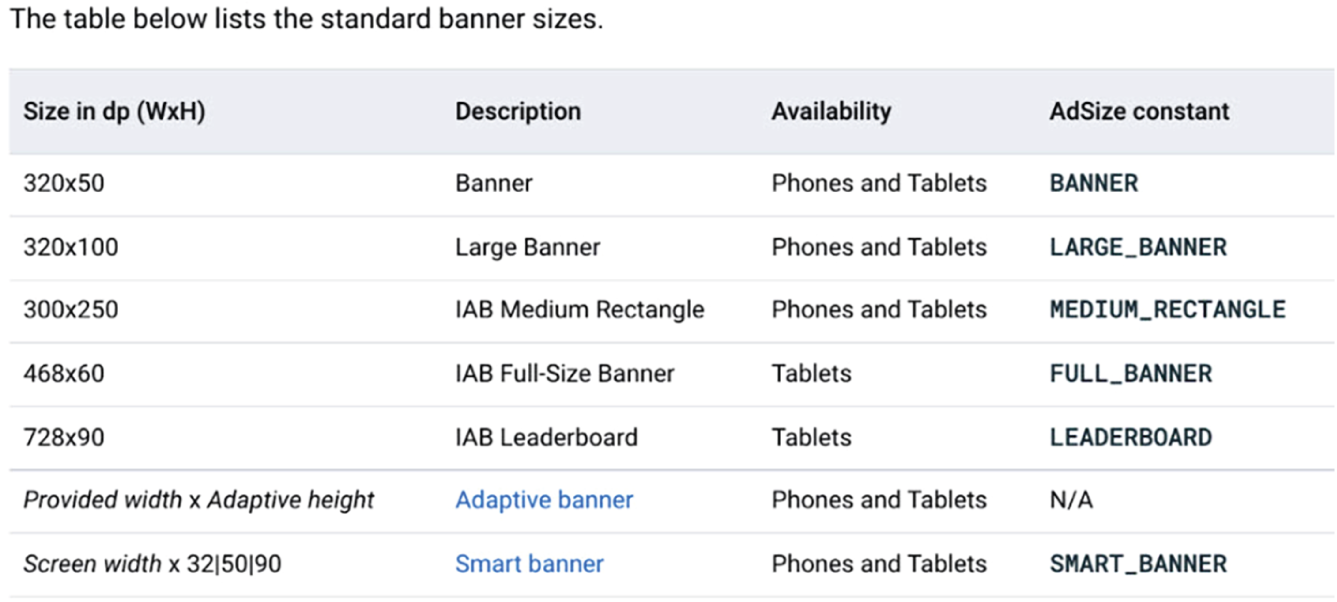
For many years, Google’s mobile ad network was DoubleClick, a company that Google acquired in the early days of mobile advertising and that they evolved and grew over time. Now the company has been rebranded and incorporated with other Google advertising options as part of Google Display, Video, and Search 360. This platform combines a variety of digital advertising options that are prominent on mobile devices. The standard mobile banner sizes are listed in Figure 8.3.
To make banners mobile‐friendly but also mobile‐performant, it is important to adapt desktop banner designs. In your design process, be careful not to overwhelm the ad unit with too much information or imagery, which can hurt more on small mobile screens than it does on desktop. In terms of colors, high‐contrast designs tend to perform best, but the more a banner looks like it belongs on the website or app, the more likely it is to get the user’s attention, so there is a delicate balance to be had. Limit the number of fonts, colors, and text used in the ads, and make sure that calls to action are meaningful and actionable for mobile users. Make sure that the buttons that users are expected to click are large enough, even if the ad is resized for smaller mobile phone screens. Also, make sure the landing pages that the banners link to are mobile‐friendly and optimized specifically for mobile conversion.
Many ad platforms allow advertisers to use HTML 5 to make their banners interactive with rich media. The interactivity can include things like geolocation, videos, and interactive animations or games. Adding HTML 5 to a banner ad means including HTML code or sometimes a bit of JavaScript that controls the interaction. This can be intimidating for some designers, but the change in success rates that these types of improvements can drive in your ad campaign will often easily justify the extra effort, and it may be worth contracting the work out or potentially even learning this as a new skill to create a more long‐term benefit. Also, some tools can help designers add these types of elements to a banner design. Whenever possible, dynamic personalization in ads can also be included with HTML 5, sometimes called dynamic creative optimization (DCO) or real‐time banner optimization, and this also can make a big difference in the response rate of the campaign. Companies like Celtra, Bynder, and Automation can help with this kind of ad creative optimization.
In some cases, usually in apps, banner ads can be shown as an interstitial. Interstitial ads are simply ads in which the banner opens over the app view that the user is on and must be interacted with or closed before the user gets back to the app engagement. Some apps use interactions like this to make their app or game profitable, but in many cases, users find these kinds of ads invasive, so be sure that if you choose to launch this type of ad, it is deployed in apps where the messaging and product offering is highly targeted to the audience and somewhat expected so that the interaction will feel less discordant and intrusive and more useful and actionable.
Video and YouTube Ads
As mobile phones and their digital connections get faster and more capable, more and more mobile time is spent watching videos or, in some cases, casting videos from phones to other devices, so you can consider the potential of mobile video marketing a lot like making regular TV commercials that are super‐targeted and potentially even interactive. This type of advertising becomes even more important when you consider the number of “cord cutters” who have stopped paying for cable TV services and replaced them with subscription streaming services like Hulu, Netflix, Amazon Prime Video, and YouTube TV. All of these streaming services are heavily focused on mobile use cases and can incorporate various types of video ads.
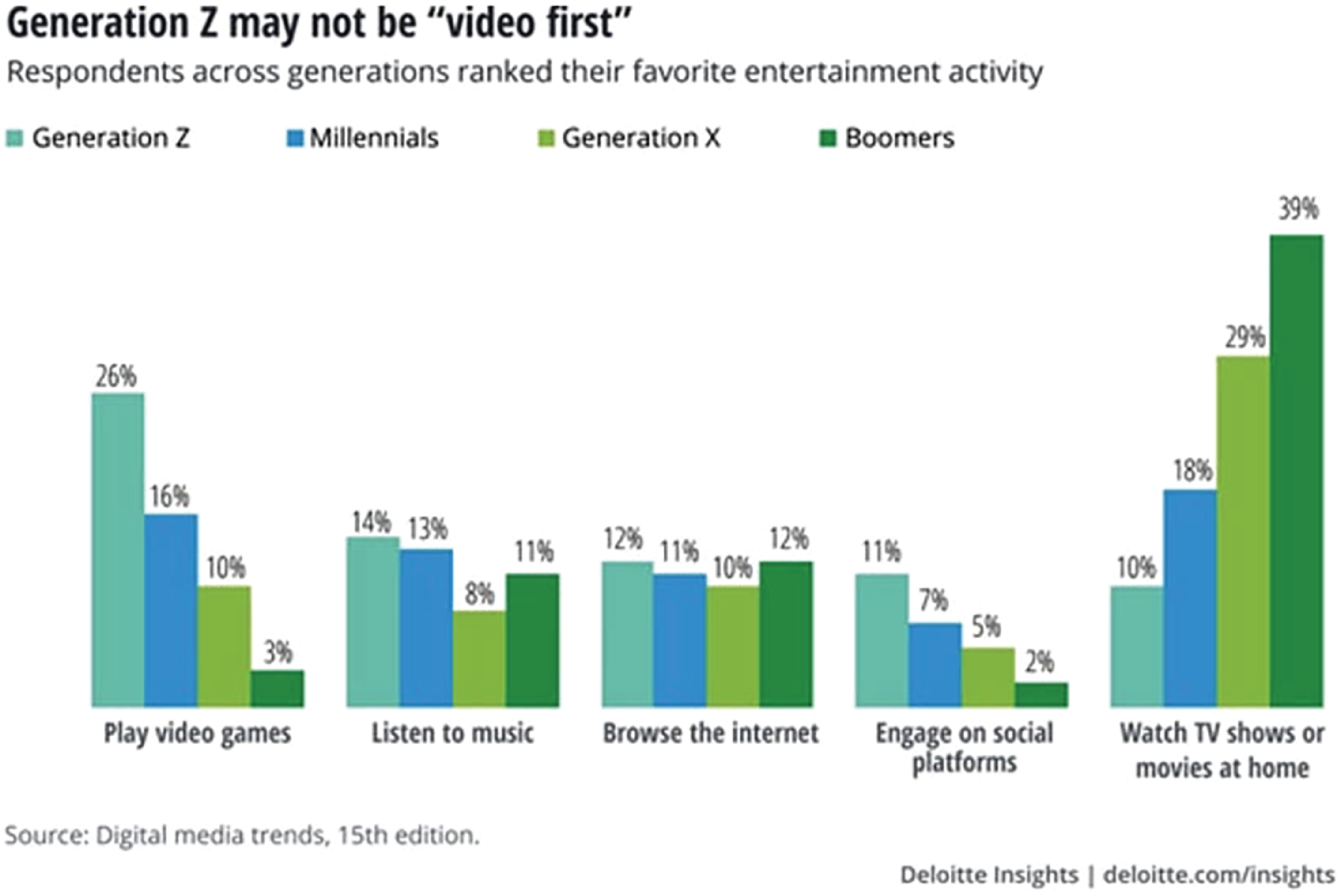
The assumption that the mobile video trend is focused only on younger generations is not quite accurate. Younger generations are more likely to stream video over the Internet, on their phones, and through social networks, but all age groups like watching videos, as you can see in Figure 8.4. As the number of cable‐cutters continues to grow, more people are consuming on‐demand streaming videos, and fewer people are watching live network programming. Video ads will soon become more available to the masses of digital advertisers, tending more toward a self‐service, digitally mediated, and targeted advertising model. These ads will more easily be available to a higher number of digital advertisers, further blurring the line between traditional TV advertising and digital video advertising.
YouTube is the world’s largest searchable video platform. In fact, YouTube now represents more than 25 percent of mobile traffic worldwide, and more than 70 percent of YouTube traffic is from mobile devices. Therefore, this section focuses on its ad offerings and specifications. In video platforms, video ads are generally sold as pre‐roll, post‐roll, or mid‐roll, depending on when the ad is shown. When you are working with Google, they offer skippable and non‐skippable in‐stream video ads, in‐feed video ads, outstream video ads, video bumper ads, and masthead ads, for display on the YouTube website home page. Skippable and non‐skippable in‐stream ads are ads that show up before, during, or after a video on YouTube and on any of Google’s video ad partners. For skippable, in‐stream ads, the videos can be as long as you want, but Google recommends a maximum of 3 minutes for any video ad. YouTube video ad views are only charged for when a viewer watches 30 seconds or more of the ad or interacts with the video.
Alternatively, non‐skippable video ads are limited to 15 seconds and are charged based on a CPM bidding model, so advertisers pay based on impressions. The ads often occur in the middle of another video, interrupting the flow of the experience, so the more targeted and useful they are to the viewer, the less likely the viewer is to be irritated by the interruption and consequently, the more likely they are to not keep a negative view of the brand on the ad because of the interruption. Bumper ads are similar, but only last 6 seconds on YouTube.
Outstream ads are another video ad option that is a bit different; they are mobile only and will begin playing on Google partner sites with the sound off, somewhat like a banner ad. According to Google, “Outstream ads can run across a variety of different mobile placements. For mobile web placements, outstream ads appear in traditional banner placement locations. In mobile apps, however, outstream ads appear in banners, interstitials, in‐feed, native, as well as in both portrait and full‐screen modes.” These ads are charged when anyone views the ad for two seconds or more so budgets run out more quickly and you have minimal time to get a viewer’s attention with a memorable marketing message.
Masthead ads are another unique option for video ads that will be seen, which can be shown on the YouTube home page, where they auto‐play without sound for up to 30 seconds. On mobile, Masthead videos include a customizable headline and an external call to action, outside of the video itself, and it also shows the advertiser’s channel name and icon. These ads can be shown on mobile, desktop, and TV, and this is becoming more and more common for video ads, as the lines between mobile, desktop, and TV use cases blur—especially for video consumption. These ads can be very valuable for driving massive brand awareness for a company because of the huge level of traffic and exposure from the YouTube homepages, but these must be reserved and booked directly with a Google sales representative, and they require specific editorial approval, so they can be quite costly.
In general, all video ads should be recorded and saved as MP4 files, with a minimum frame rate of 30 frames per second. The shape of the video is normally 16:9 for landscape videos, but some video platforms also allow 1:1 square video ads, and 9:16 portrait video ads. If it makes sense, you may also want to save a copy of video ads as an audio‐only MPG4 file type; this can be especially useful if the audio is particularly entertaining or informative even without the support of the video because this audio‐only version of the ad can be used to advertise in specific podcasts that are relevant to your audience or even in podcasting platforms, which also focus on a mobile listening audience.
Social Media Ads
One of the simplest ways to get into mobile advertising is to start with social media ads. As with many other ad options, social media ads are not exclusively mobile. A majority of social media is accessed on mobile devices, so it is heavily weighted toward mobile, and often the social network ads are more capable of segmenting mobile users from desktop users because most mobile users are accessing the network from apps. One of the best things about social networks is that the social networks have access to and report on a lot of good demographic information about themselves and their audiences. As you can see in Figure 8.5, users of social networks often self‐select and are organized based roughly on age‐groups and interests. Doing your research before deciding where to focus advertising dollars can be crucial.
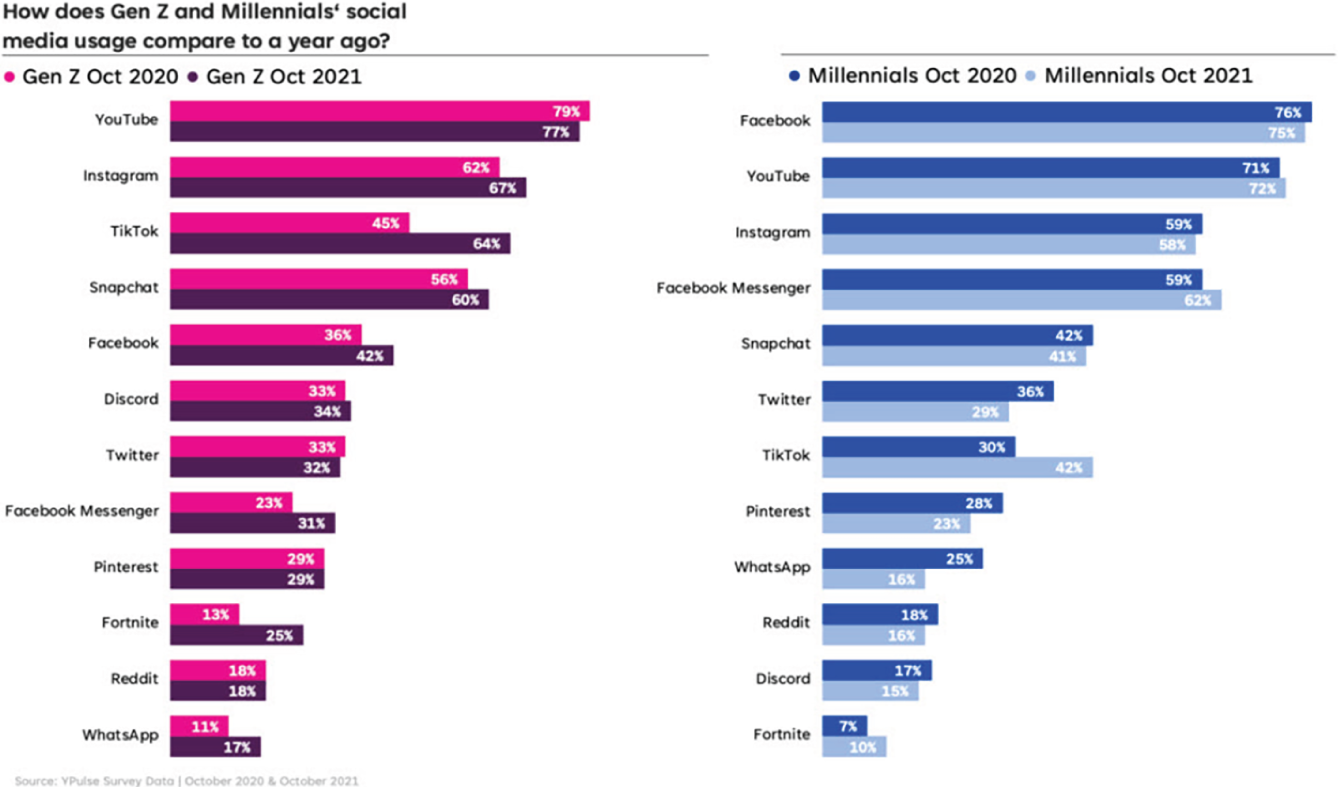
YouTube is the top social network for Gen Z, and it is growing for that age group, and while it is shrinking a bit for Millennials, it is still the second largest social network where Millennials congregate. Facebook is the largest social network for Millennials, and it is still showing growth, whereas for Gen Z, the Facebook audience is much smaller and shrinking with time.
Social media ads are a good way to achieve targeted reach effectively because the social network ad platforms allow you to target your ads based on what the networks already know about their users. This means that you can do a pretty good job of targeting ad campaigns for your mobile app or website and landing them accurately at the intended destination for top conversions from social media sites. Often, social networks like Facebook and LinkedIn will also allow you to start with a seed list of “known users” who fit certain criteria and then expand it to build out specific cohorts and look‐alike groups of users that you don’t know directly but who have demographic characteristics of your happiest existing customers, for example. With the right messages, this can be a very powerful way to quickly expand your brand reach and exposure to the target markets and demographics that are most likely to convert.
One important thing to look out for in social media marketing on mobile is the behavior of the ad or post when it is clicked from the social media app rather than the website. Some social networks will open any link in the phone’s default mobile browser, like Chrome or Safari. Others will keep users in their app in a window that looks more like the browser but is actually still part of the social media app. These social media hosted, in‐app browsers are sometimes not as capable as regular mobile browsers and, thus, can struggle more with complex code like stylesheets that are used for layout and JavaScript. In the worst cases, entire ad campaigns can be built to take visitors to a landing page that has been extensively tested on a traditional mobile browser, but not tested in the in‐app browser of the social network where the ad is placed, potentially hurting the engagement or limiting conversion all together. That means the money spent to get traffic from that app was almost entirely wasted.
To add more complexity, some social media apps use their own in‐app browser for one OS but the default mobile browser outside of the app for the other. That means that if you are placing ads in any social media site, it is important to test the landing page not only in all the popular mobile browsers, but also in the in‐app browsers for both iOS and Android versions of the social network app. The effort might be a bit more extensive than expected, but this is important to ensure that your ad budget is not wasted.
In‐App Ads
Companies like InMobi and Tapjoy allow you to place ads for your app (or sometimes website) in other apps. This can be a great way to target app ads by operating system because you can easily segment specific ads to only show up in iOS apps, to promote your iOS app for iPhone, and only show up in Android apps to drive downloads for the Android version of the app. App ad networks can work in a variety of ways, sometimes allowing you to pay for impressions in certain types of apps or for impressions with certain types of audiences.
Google says, “Each time your ad appears on Google or the Google Network, it’s counted as one impression. In some cases, only a section of your ad may be shown. For example, in Google Maps, we may show only your business name and location or only your business name and the first line of your ad text.” With other models, ads only cost money when a click leads to a conversion, or the ads can be priced based on a variety of similar pricing models that vary based on volume, app targets, demographic targets, or cohorts. Google defines a cohort as “a group of users who share a common characteristic that is identified in this report by an analytics dimension. For example, all users with the same Acquisition Date belong to the same cohort.”
If you like working with Google, they have an app ad network called Ad Exchange (discussed previously), which allows for a variety of different types of in‐app advertising, including full‐screen app interstitial ads that happen at natural transition points in other apps, video interstitials, native ads, banners, and animated banners. These ads generally include fallback options in case something unexpected limits the availability of your ad to be shown—a nice perk. One benefit of Google is that they allow a few different ad destinations, including of course driving viewers to an app download, using a deep link to move viewers from the app that they are in, to your app, to a call, or to a website URL.
On‐Site App Ads
When you have an app and a website, it is always a good idea to use your website to help drive downloads for your apps. This may seem obvious, but it is often overlooked. You can promote a branded app from a website in a variety of ways. You should obviously have a landing page that describes your apps and links people to their pages in each of the app stores where they can download it, but you can also use on‐site app promotion to drive downloads throughout the site. Even though you may be giving it away for free, it is best to think about apps like another product or service that you sell and promote it accordingly.
You can use a system called smart app banners to promote your app directly from your website. Code is added to the website, and if the system determines that a visitor does not have the app installed, the banner will link them to the app download page. If they do have the app installed, it can detect the operating system of the visitors’ phone and use a deep link to get them directly to the corresponding screen in the correct version of the app, so that they can continue their engagement or take advantage of a promotion directly in the app rather than on the website. There are different methods for setting this up for iOS and Android, but the good news is that these “ads” are actually free, and they can be very useful if you know that your app converts better than your website.
From a user perspective, smart app banners are nice because the ads take up only a fraction of the mobile screen, unlike other types of app interstitials that are common on websites. The small footprint of the smart app banners makes it easier for the users to continue interacting with the website as they wish and then engage with the smart app banner when they are ready or dismiss it entirely. Smart app banners load at the top or the bottom of the mobile page and stay present even as the users scroll. These are also considered the SEO‐friendly option for actively promoting an app from a website, especially when compared to full‐screen app interstitials on a website, which can create a frustrating mobile experience and can prevent Google from crawling and indexing your content.
Leave a Reply