One step you shouldn’t overlook in your Facebook marketing campaign is to like other brands, even competing brands. Many people are afraid to like competitors because they feel they’ll lose community to someone else. This fear isn’t founded at all. People who like brands on Facebook like many different brands, even if some are similar.
Here are some of the benefits of liking brands on Facebook:
- Using your brand account, you can participate in discussions happening on other pages. Your comments may inspire others to check out your brand’s page and like you.
- It puts you on the other brand’s radar, which may be a good thing. They may want to use and recommend your product or service one day or collaborate on a promotion.
- It creates brand awareness. The more people who see your logo, the better. When people see your logo on the social networks, it instills trust. They feel you’re more accessible.
- It helps to establish your expertise. When you participate in discussions and respond to comments and inquiries in a knowledgeable manner, people see you as an authority and are inspired to follow you on the various social media channels.
 Be sure to follow the rules of social media etiquette and avoid dropping links on another brand’s page unless you’re invited to do so. The last thing you want is to have a reputation as a spammer. Also, if Facebook feels you’ve been spammy, you could lose your account.
Creating Facebook Events
The power of community is a wonderful thing. A tight-knit community will rally around the brand for all occasions. They’ll comment on blog posts and social networking updates, respond to promotions and discounts, and attend events. In fact, a good way to gauge community interest is to create an event.
What is an event? Events include the following:
- Sale
- Party
- Tweetup (a real-world meet-up organized on Twitter)
- Conference
Events can also be online affairs, such as the following:
- Webinar
- Contest
- Twitter chat
When you create an event using Facebook, you have the opportunity to invite everyone who likes your brand’s page to attend.
Creating events doesn’t take much time at all, and they’re simple to set up. Just follow these steps:
- Click the Event button (under the text box where you post content).A pop-up screen appears.
- In the box that appears, enter all the details of your event.You might enter the event name, date, time, and location, and a few words about the event. As you enter information, you’ll see a preview of your event post on the right side.
- After you’re finished, click the blue Next button.You’re prompted to enter the physical location of the event and click Next.
- Upload a cover photo for the event, any ticket or registration information, and click Create Event.Make sure the image is representative of the event. In other words, if you’re having a cupcake showdown, don’t upload a picture of your puppy!
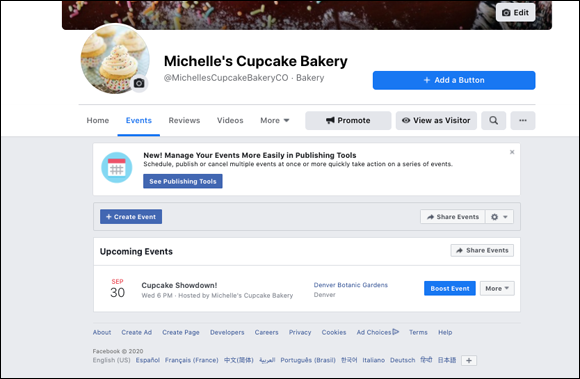
- Navigate back to your page’s news feed and click the Events tab in the menu bar.You’ll see all scheduled events listed at the bottom of the page, as you can see in Figure 1-9.
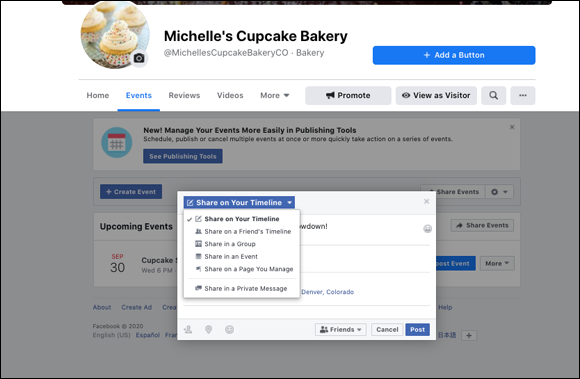
- Click the Share Events button on the right side of the event’s listing.A pop-up box appears in which you can enter a message and choose where to share the event (Figure 1-10).
- Click the blue Post button to share your event.
Don’t use events as invitations to spam. If you post about the event a couple of times a day to your news feed to drive traffic and sales, you’re going to lose your community and possibly your Facebook account.
Leave a Reply