
Many brands set up a Facebook account without any idea of what to do with it. Just like with a blog, website, or even a Twitter account, you have to have a plan. To just randomly post topics and hope they stick will lead to inconsistency and confusion.
 Facebook is constantly changing the rules for brands and brand pages, and to enter into Facebook marketing blindly without any planning and research on your part can mean Facebook will penalize your page — or even your personal account. A poorly executed brand page can reflect badly on you, as a social media marketer, and on your brand.
Take some time to put together a plan before you get started. If you already have a Facebook account for your brand and it needs an overhaul, pretend you’re starting from scratch and plan a strategy anyway.
The first item to check off your list is your goal. What do you hope to achieve with your Facebook account? You won’t be able to plan the right types of content without listing your goal first. For most brands, the goal is to build a community of advocates, which will lead to traffic to the main company website and, hopefully, sales.
After you know your brand’s goal, you want to plan the type of content that will help lead to that goal. Now, this doesn’t mean if you’re looking for sales, every Facebook post should be selling something. However, you should post with sales and the people who help you achieve your goal in mind. (For more on creating content, see the section “Creating Content That Sings,” later in this chapter.)
What follows are some ideas for the types of goals you might want to achieve with your Facebook page, as well as the content to help you best achieve each goal:
- Drive sales. Your content should inspire a sale but not necessarily be a sales pitch. For example, has one of your customers been in the news as a result of using your product? If so, share that story. Do the ingredients in your products have health benefits? If so, talk about them and share other healthy living tips. Do you offer a business-oriented coaching service? If so, use your Facebook page to share tips and best practices. In this manner, you’re not exactly selling, but you are putting the idea of the sale in people’s minds.
- Increase your community. Your updates should be more conversational. The people who join your Facebook page will do so because of the engaging content, which will help to establish trust. This trust leads to community growth and sales through customer loyalty and word-of-mouth marketing.
- Grow your mailing list. Do you want more people to sign up for your newsletter? If so, offer sneak peeks of what they’ll receive if they sign up.
- Create brand awareness. When you share news and updates regarding your brand, it shows up in news feeds belonging to the people who are Facebook fans of your brand. When they like or comment on your public posts, those actions can show up on their friends’ and families’ news feeds, as well. When people share your content, it helps to turn your brand into a household name.
- Establish expertise. Use Facebook to share facts and drop tips. This approach is especially useful in selling books, providing informational products and services, and promoting blogs.
- Receive feedback. Use Facebook to create polls, ask questions, and pick the brains of the people who use your product or service. Just be sure you’re ready to receive some brutally honest answers.
- Drive traffic. Link to your blog posts and web articles, and create discussions around the day’s topics.
- Have multiple goals. Most brands have multiple goals for their Facebook pages. Mixing and matching content to serve many different purposes is okay. Be mindful of sharing too many links, however, because it can be perceived as spammy.
 You may not necessarily see your timeline cover photo as a sales tool, but as the first thing people see when they land on your Facebook page, that’s exactly what it is. The photo may not be of your product or service, but it should inspire the sale. (For more on setting up your timeline cover photo, see Chapter 1 in this minibook.)
Take time to understand your community. Watch them interact on the various social networks and watch how they interact on Facebook with you. Use your Facebook Insights and analytics to observe the types of content they best react to and what they shy away from. When you know your community, you can plan the most successful types of content. See the last section in this chapter for more information on Insights.
Sharing Your Brand’s Story
Facebook’s timeline for brands is created so that you can share your brand’s story from the very beginning. This chronological approach is a beautiful opportunity for your customers to find out more about your milestones and feel connected to your history.
Your community enjoys being made to feel as if they’re part of the brand, even learning some secrets about your brand or being regaled with tales from back in the day. When your customers feel connected to you, they’re more likely to share your stories — and products or services — with their friends and family. The more stories you share, the more brand loyalty is inspired.
Some items you may want to include on your brand page include the following:
- A brand logo: Use your logo as the profile photo — it helps to promote brand awareness.
- A cover photo representative of your brand: Your timeline cover photo is designed to catch the eye of anyone landing on your page.
- A blurb describing your brand: You have the opportunity to grab the attention of potential customers with a couple of forceful sentences under your profile photo.
- A longer brand description in the About section: Use your timeline’s About section to tell potential customers what you do and how your product or service will benefit them.
- Links to your website and social media pages: Your Facebook community isn’t network-exclusive. Many of your customers enjoy interacting at your blog or on Twitter, too. Be sure to include links to all the different places folks can follow you.
- Contact information: Include your email address in your timeline’s About section. Also consider including other important contact details, including a customer service phone line and address.
- A specific action: In the area where you post, you’ll see boxes enabling you to take specific actions. For example, you can add a feeling or activity, which gives you the ability to share your excitement about an upcoming product launch. You can also create an offer to share a discount with your customer or a post to drive newsletter subscription signups.
- Events: Are you having a special sale? Throwing a gala? Having a Twitter chat? If so, use the events function. You can invite people individually, and also have the event show up in your timeline. Use events sparingly, however. No one wants to be hit up with an event invite every day.
- Photos and videos: Your online community is especially receptive of photos and videos. You can share images of your team and offices, old historic photos, and even videos of your company’s old television commercials. The options are endless. Photos and videos are shared more often than any other content, as well.
- Live: You can live stream from a company event or while walking through your office to give a behind-the-scenes look into your company culture.
If you have co-workers who can be … ahem … a little unpredictable, you may want to steer clear of them if you’ll be live streaming. There’s no time delay to edit something out!
Creating Content That Sings
If you create a Facebook content strategy, you should have some idea of what to talk about with your Facebook community. Planning content by using an editorial calendar or a spreadsheet can help to keep you from posting stale updates because you don’t know what to say.
Before creating content for your Facebook page, visit some successful pages to see how those brands handle content. Seeing how other brands are engaging their communities can inspire you to do some neat things of your own. Also, visit competitors to see what they’re doing right, as well as what they’re missing. There may be an opportunity to fill a void with some much-needed content.
 Your content isn’t about the sale, but rather the conversation and engagement that may lead to the sale. Make sure to provide a mix of fun questions, photographs, videos, and informative articles and blog posts.
What follows are some tips for creating good content for your Facebook page:
- Don’t make everything serious and deep. It’s best to keep brand interaction light. Although thought-provoking questions and discussions are part of a good content strategy, don’t forget to add humor to the mix.
- Brevity counts. Although you can be wordier than when using Twitter, Facebook isn’t your blog. Keep updates brief. Too many words, and people lose interest. Write for the short attention span.
- Stay on topic. When you write about a mishmash of things that have nothing to do with your niche, people get confused. If yours is a cereal brand, your community expects topics centered on cereal — for example, nutrition and recipes. If you start talking about cross-country skiing or barbecue grills, people are going to wonder what any of that has to do with your brand.
- Try to create content that’s open-ended. Give your community opportunity to respond. Ask questions or talk about the sorts of things that provoke a discussion. Make sure everything you post is inviting a response.
- Let your comments be your guide. What kinds of questions does your community ask on your page? What posts do they most respond to? When they do respond, what do they say? Look to your community for topics. If certain topics stir up more interest than others, plan more of those types of topics.
- Proofread everything you post. When you don’t take the time to read over everything and eliminate errors and typos, it tells your community you don’t care enough about them to communicate error-free.
- Look to your blog or website traffic for ideas. If people are using search terms, phrases, and certain topics to land on your content, use these same topics when creating content for your Facebook community.
- Be careful of TMI. Although you should use a personal touch on a brand page, there’s such a thing as too much information. Avoid making your brand page about you as a person, unless the brand page is for your personal brand.
- Don’t be afraid to court controversy. You don’t want to always have negativity and squabbles on your Facebook page, but the occasional controversial topic does wonders to create a discussion.
When you post too many controversial topics or allow a lot of negativity on your brand page, eventually the only people who come around are those who thrive on drama and negativity. A positive attitude, with positive content, will inspire positive results.
Sharing and Being Shared
Sharing is an important part of brand page interaction. Creating the right types of content means that same content may be seen by thousands of eyes. When your community and others share your content, it generates brand recognition and word-of-mouth marketing. If you’re known for creating interesting and creative content, you gain even more fans on your Facebook page, which means more potential sales.
Be careful not to write for Facebook, an inanimate thing, instead of people. Too many brands make the mistake of creating content for its ability to go viral, as opposed to making content that resonates with people. When all your content is obvious click-bait, your fans will grow wary of all the shocking headlines and exclamation points.
People like to feel as if they discovered something wonderful. Sharing items with their friends and family sometimes can make them feel as if they created that content themselves.
When someone clicks the Share button below something you posted, it means your content is going to show up in the news feeds of that person’s friends, as well. If a dozen fans with 200 friends each share your content, your post has the potential to be seen by 2,400 people. Out of all those people, it would be terrific if ten new fans like your page as a result. However, even if they don’t, sharing is creating brand recognition.
If you’re recognized for putting out shareable content, more people will follow and use your brand, and your brand will be seen as a respected authority in your field.
Posting content that followers will want to share
So what types of content do people want to share?
- Photos: People share more photos than anything else. Make sure that your photos are relevant, thought-provoking, discussion-worthy, and even amusing, but don’t make them offensive. People see photos before they see words, so put some thought into the photos you share.
- Funny or amusing content: People like to share content that makes them laugh. Post tasteful but amusing photographs, blog posts, or videos.
- Heartwarming stories: People love a good success or comeback story. They enjoy hearing tales of folks who beat the odds. People share inspiration.
- Relatable content: Ever read an article and think, “Oh my gosh. This happens to me all the time!”? People respond well to content they can relate to. Create content based on experiences everyone in your community may share.
- Discounts: Most people who follow brands do so in hopes of receiving special perks that they can share with their friends and family.
- Live video: Facebook’s Live feature enables businesses and individuals to share news and events as they happen.
- Jobs: Do you have a job opening at your company? Use Facebook’s job posting capabilities to share the details.
- Lists, tips, and how-to’s: People enjoy sharing learning experiences. Share tips or steps to success.
Say thank you to the people who share your content. When they’re called out in a positive manner, they’re more inclined to continue with the support. If another brand page shares your content, try to do the same for continued cross-promotion.
Don’t sit around waiting to be shared, however. Do some sharing of your own. Take some time each day to visit other Facebook accounts and find content relevant to your community to share. This goodwill toward other brands puts you on their radar, and they may want to reciprocate. In addition, your community will appreciate your finding discussion topics or images to share with them. This especially works if you switch your Facebook identity to that of your brand page and not your personal account.
You don’t have to limit shared content to Facebook posts or your own content creation. Sharing blog posts, images, videos, and podcasts by others will help create goodwill among different communities and will bring in more awareness of your brand page.
Using hashtags in your posts
Hashtags make topics searchable without having to use a search bar or search engine. When you use a hashtag in your Facebook post, it’s visible to all who search for the topic used in your hashtag. For example, if you’re posting a healthy recipe using the grain quinoa, you can use the hashtag #quinoa, #recipes, or even #healthy. Now everyone who’s searching for that same hashtag will see your post.
Here are some best practices for using hashtags:
- Use hashtags sparingly. Too many hashtags hurt the eyes. Try for one or two — any more than four is too many and makes your update look cluttered and confusing.
- Hashtags should make sense. Don’t use a hashtag because it’s popular or trending. Use one that works with the content. The last thing your brand wants is to be accused of hashtag jacking, or spamming a hashtag with your irrelevant content.
- Hashtags are all one word. Avoid spaces and hyphens when using hashtags. They’re all one word, usually all lowercase.
- Do a search before using a hashtag. If you have a hashtag you want to use, do a search of that hashtag first. It could be in use or could have previously held inappropriate content.
- Don’t worry about uppercase or lowercase. Hashtags are usually all lowercase. Don’t worry about making sure words are separated by capital letters.
- It’s okay to use a unique hashtag. Don’t be afraid of making up your own hashtag. A unique hashtag can help your brand stand apart.
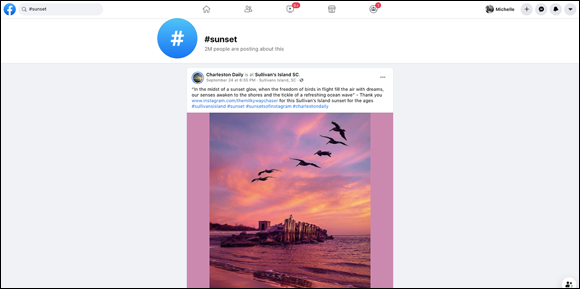
Hashtags are searchable on Facebook (see Figure 2-1). Look to see how many people are posting about that hashtag and aim to utilize popular (but still relevant) ones.
Bringing Your Community into the Mix
Every tip you read about Facebook will come to nil if you don’t have a positive, productive community. The more people you have liking your brand page, the more people you have responding to and commenting on your posts and campaigns. You want your community members to feel good about participating, and when they feel good, they share and they buy.
The last thing you want is a timeline filled with random updates. Take some time to explore the different Facebook apps to find out how to better interact with people. When you share in different, unique ways, your community will grow, and so will sales and brand recognition.
Selling on Facebook
It used to be that people on Facebook weren’t there because they wanted to buy or find a good bargain. They were there to keep in touch with family and friends near and far. But the truth is, the platform has come a long way since its inception. Now Facebook offers the perfect social shopping opportunity because people can socialize, shop, and share. In fact, people are more likely to buy something they see their friends buying and if they don’t have to even leave the platform to do so.
Facebook has specific rules about what brands can present to their communities, especially when it comes to selling, promoting, and holding contests. If not kept in check, Facebook can become a haven for spammers, so regulations are necessary. It’s a good idea to familiarize yourself with Facebook’s Terms of Use for brands before selling; go to www.facebook.com/page_guidelines.php.
Facebook requires the use of specific apps for selling and promotions to keep spammers out of the mix and to ensure that all opportunities are legitimate. So to sell on Facebook, you have to do so the right way.
Here are a couple of apps to help you sell on Facebook:
- Facebook Store: This feature gives you the opportunity to create a shopping experience on your timeline. The app appears as a Shop button and allows you to display merchandise or sell products and services. The number of items you can sell depends on the third-party application you’re using.
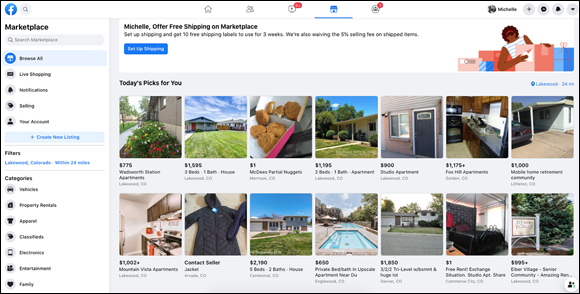
- Facebook Marketplace: This feature allows your advertisement to appear in classified advertising format. Figure 2-2 shows you a typical Marketplace page with the search bar and categories on the left side of the page.
Facebook advertising is a terrific way to sell products and reach people who share similar likes and interests.
Not all your selling on Facebook has to be via apps and widgets. You can also create action terms and phrases to post on your timeline that lead your community to your website. Sharing news about a sale, new merchandise, or a discount is fine, as long as you’re not spamming.
Creating polls, quizzes, and contests
For a truly interactive experience, you have to give your Facebook community the tools to get the party going. Asking questions or posting links is only a small part of growing your Facebook network. To truly tap into the power of the people, create some other fun experiences.
Polls
Polls can be fun and frivolous, or you can use them to collect information about the consumer. People like to participate in polls because they feel as if they’re part of a campaign. Plus, creating a poll isn’t a big-time commitment; with a simple click of the button, you have the user’s vote.
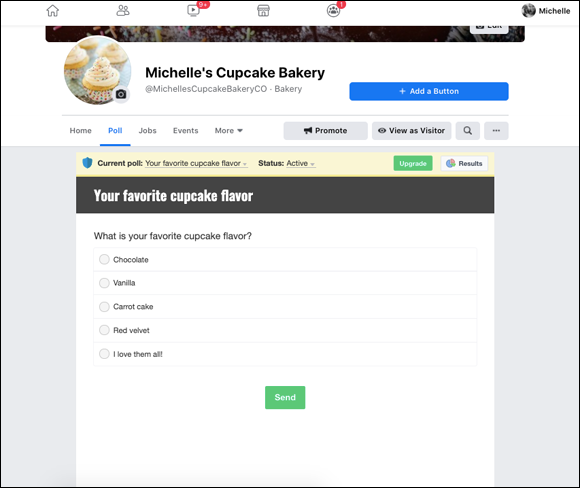
Facebook’s poll app, available at www.facebook.com/simple.polls, allows participants to add comments about why they voted as they did, and you can also configure the poll to allow participants to add their own items for folks to vote on. Figure 2-3 shows what a poll and tab looks like on your page.
Polls are best advised for big, active Facebook communities. When smaller communities put out polls and have a poor showing, they may receive only a couple of responses. The last thing you want is to promote something publicly and have a poor showing.
Quizzes
For even more community interaction, try creating quizzes. Quizzes aren’t necessarily a way to gather information from your community, but if the quizzes are entertaining, the people who take them will share them with others in the community.
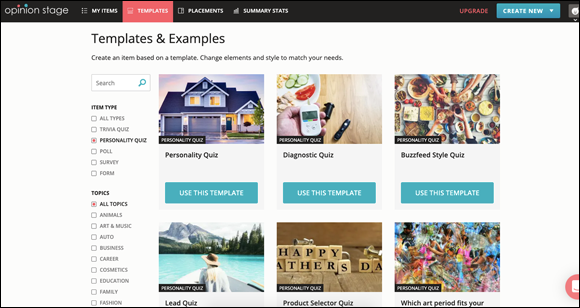
With a quiz-building app like Opinion Stage (www.opinionstage.com), you can take advantage of various templates (see Figure 2-4) to make fun, creative quizzes for your page. For example, if you’re representing an Italian restaurant, create a quiz seeing how many Italian words and phrases your community recognizes. If yours is a car brand, list the parts of the car and see whether your community knows what each part does or where it’s located. At the end of the quiz, have a ratings score for expertise. These quizzes are frivolous, but fun and extremely shareable. They’re also great community-building tools.
Contests
Contests are another way to perform community outreach and raise awareness of your brand. However, like with selling, Facebook has specific rules about contests. You don’t have to download a special app to host contests, but Facebook does have specific rules as to what is and what isn’t allowed.
Check out this list of contest apps from Venture Harbor and try out the different options to see which one best fits your needs. (www.ventureharbour.com/facebook-contest-promotions-apps).
Before running a contest on Facebook, read Facebook’s promotions policy. Check the policy each time you run a contest because the rules often change, and you don’t want to be caught unawares. See Facebook’s Terms of Use for pages at www.facebook.com/page_guidelines.php#promotionsguidelines.
Offering discounts to your community
One of the main reasons people follow brands on Facebook is that they’re interested in receiving bargains, freebies, or discounts. In fact, these types of perks are a terrific way to reward your community for their loyalty.
When you offer discounts and perks that are available only to your Facebook community, it makes people feel special and inclined to share your brand with others. Discounts are what fans share the most when it comes to brands.
You can offer discounts in a variety of ways:
- Set up a unique code for your Facebook community only.
- Link to discounts on your website.
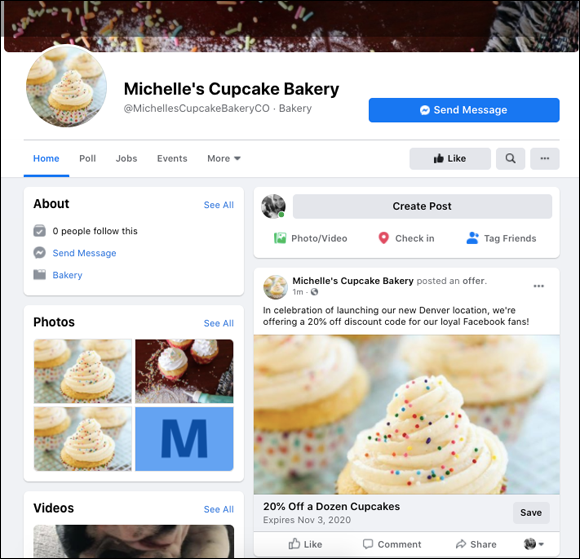
- Use the Facebook offers feature shown in Figure 2-5, which enables you to post your discount and an image (and they then appear in your fans’ news feeds). This feature is found in the status update box when you select the Create an Offer option below the box where you post content.
Do be careful not to spam your Facebook page with discount codes and sales pitches. Although your community is interested in receiving bargains, they’re not interested in reading spiel and jargon every time they see an update from you. Balance your discounts with other content, and don’t post sales or discounted items more than once per day.
Making Connections with Facebook Groups
Brand pages and groups are different in that pages are for fans to have conversations and learn about a brand, whereas groups allow like-minded people to interact and have conversations on a more expansive basis. Although you wouldn’t have dozens of conversations going each day on your brand page, you can have many conversations going at the same time in a group, where members can opt in.
Facebook groups are a way to have more interaction with your customers or fans, and to encourage them to interact with each other. People tend to let their hair down more in a group than on a public Facebook page. Some active groups are updated often throughout the day. Groups turn fans and customers into a thriving community of participants.
To create a Facebook group, follow these steps:
- Click the Groups function in the left sidebar of your Facebook home page.
- Click the blue +Create New Group button in the top left of the page.The Create New Group dialog box appears.
- Determine your Group name, invite members, and select your privacy options.Facebook enables users to select the level of privacy for their group in order to allow for more intimate discussion. Sometimes people want to share their opinions but aren’t comfortable doing so because liking or commenting on a public page can mean their Facebook friends may see what they’re doing.There are different levels of group privacy:
- With a Public group, anyone can see the group’s messages and members.
- With a Private group, only members can see posts and other members.
- Hidden groups do not show in Facebook searches.
- Visible groups will show up when someone searches for your group’s topic.
- Click Create, and you’re good to go.
Don’t create a group unless you already have people to invite. Facebook won’t allow you to create an empty group.
After you start your group, you can do a few things to make it interactive and appealing. For example, you can upload a cover photo that’s representative of the group. You can also pin a welcome message or group rules to the top of the page.
Groups allow you to share photos and even upload documents and files, so be sure to spend some time exploring all the different features.
When creating separate discussion groups on Facebook, don’t allow them to turn into cliques. If members feel excluded, they won’t feel as strongly about your brand. Continue adding members to your groups to keep the interaction fresh.
Learning through Insights
Facebook continues to evolve, with the rules for brands changing all the time. Although some social media marketers aren’t thrilled with many of the changes, most are reluctant to move away from Facebook because it’s still where most of their customers converge.
No matter how they feel about Facebook’s changes to both algorithms and rules for brand pages, marketers can’t deny the benefit of using Facebook’s Insights, or analytics panel, to learn more about their customers and online community. This section is just the tip of the Insights iceberg.
The more you use Facebook Insights to analyze your page’s content, the more your page will grow. The information on your Facebook page offers a valuable look into your Facebook community’s habits. When you know how they behave while they’re on Facebook, you can create the type of Facebook content that they will best respond to. When you plan your Facebook content strategy, make sure to allow time to analyze all the data that comes with Facebook Insights.
Getting the scoop on your fans through Insights
Facebook Insights is an analytics tool for your brand page that enables you to see what your community is up to and keep track of likes, unlikes, and comments. You can even access downloadable reports for in-depth analysis. In short, Facebook Insights gives you a peek into what people are doing when they land on your page.
Through Insights, located at the top of your brand page, you can determine your Facebook page’s success. Here is some of the information you can find out from Facebook Insights:
- How many people liked your page each day, week, and month: In addition to finding out how many people liked your page on a daily, weekly, and monthly basis, Insights also breaks down the likes by demographics. A downloadable spreadsheet shows these numbers over time, enabling you to gauge growth and loss.
- How many people unliked your page: Don’t just measure likes. Learning how many people unliked your page is important, too. It helps you determine how your Facebook community is reacting to your content and the amount of updates you’re serving up each day. Knowing which topics and content lead to the most unlikes can help you to share only content that provokes a more positive response.
- Organic likes versus paid likes: Learn whether the likes you received were achieved via people who landed on your page on their own or who were brought in through paid advertising. If you find that most likes are through paid advertising, analyze your content to see why it might not be bringing in many organic views.
- Where your likes happened: Insights tells you whether likes were achieved by a computer or a mobile device. If more people are viewing your brand’s page through their smartphones, be sure to provide the type of content that’s easy to view on a smaller device, and maybe offer some sort of coupons or perks for people who might be on the go.
- Your page’s reach: Because likes, shares, and comments can be seen by people who aren’t fans of the page, each post has the capability to reach many people. Insights will let you know your Facebook page’s true reach.
- Engagement per post: Insights breaks down each post and lets you know how many comments, likes, and shares it received.
- Types of posts: You can find out which types of posts do better than others — for example, if a humorous image gets more engagement than a link to a blog post or straight-up text.
- Pages to watch: You can watch Facebook pages via your brand’s Facebook page. That is, you can keep an eye on competitors’ pages and see how their most popular pages are performing by using the Pages to Watch feature in the Overview section of Insights.
- Information about external referrals: Insights details which outside websites are sending people to your Facebook page, such as if you’re receiving traffic to your page from a search engine or a link from a website.
- Details on demographics: Facebook Insights offers a variety of demographics, including age, gender, and location.
Putting Insights data to good use
Now that you have all this information about your Facebook community, what are you going to do with it? The reason Facebook provides Insights for pages is that they know how important it is for you to see whether Facebook offers good ROI, or return on investment. By analyzing the data offered in Insights, you can make any needed improvements and drive even more traffic and engagement to your Facebook page.
Take some time each week to check out your Facebook numbers and make note of the following:
- If your likes are going up: You’re doing something right! When people like your page, it means they’re interested in your brand. It also means the promotion you’re doing on behalf of your Facebook page is working, and you’re creating the type of content folks are responding to and sharing. Continue doing what you’re doing — but don’t be afraid to add different types of content to see what your Facebook community best responds to.
- If your likes are going down: You could be losing Facebook fans for a variety of reasons. Maybe you’re updating too many times a day. Two to three times per day is optimal. Any more than that, and people are going to tire of seeing you in their news feeds. It can also be that you’re not offering the type of content they find interesting. Experiment with different types of content to see what they react to most.
- If your likes aren’t doing anything: You want your page to receive new likes daily, and if this isn’t happening, you have to step up your game. Try changing your timeline photo to see whether you can find one more appealing to your community. See what you can do to find the type of content or images that appeal at first glance to the people landing on your page.
- If people are responding well to certain types of content: Take note. If people are commenting, liking, and sharing certain content on your Facebook page, this is the type of content you want to continue to provide. Do still create a good mix of different types of content, but give the people what they want, as well.
- If your demographic is made up of people of a certain age: If your community is made up of 20- or 30-year-olds, tailor most of your content to appeal to people in these age groups.
- If specific types of content receive more engagement: If you notice photos and videos get more shares and comments than a simple post with a few sentences of text, add more visual content to your Facebook page.
- If no one is responding to certain types of content: If you post certain types of content and no one is responding, your community isn’t interested. Avoid posting this type of content in the future.
Leave a Reply