
After you set up your Facebook Page, you can start promoting it to your existing customers to build an engaged Facebook community. But first, you must prepare your Facebook Page for those new visitors!
Begin by publishing informative, relevant content that keeps your fans engaged, which can eventually lead to increased sales, subscriptions, or other business objectives. But remember to choose quality over quantity!
 The more fans who interact with your Page, the more stories that are generated to their friends’ News Feeds, resulting in a viral effect. These word-of-mouth features — friends telling friends about the brands they interact with — represent the real marketing power of Facebook.
The following sections give you the lowdown on getting started on cross-promoting your Page.
Posting content new fans can engage with
When potential fans visit your Page for the first time, they’ll likely ask “What’s in it for me?” Make sure that recent posts are useful, interesting, and relevant to the communities you’re promoting your page to.
Start by assessing the interests and personalities of your existing communities. If you’re promoting your Facebook Page to your Pinterest community, for example, make sure that your recent posts on your Facebook Page reflect the topics of your most popular boards and pins. This way, when your Pinterest followers visit your Facebook Page, they’ll be more likely to engage with your Page posts and like your Page.
An easy way to accomplish this goal is to repost the most popular Pinterest pins, Instagram photos, and so on. Again, just make sure that the content is relevant to the audience to whom you’re promoting your Page.
To understand what your email subscribers want, research your most popular email messages based on open rates and click-throughs. Most email marketing solutions, such as MailChimp and Constant Contact, allow you to analyze how subscribers interact with your email messages.
Now it’s time to let the world know about your Facebook Page URL, as described in the next section.
 To see how to create a custom Facebook username, see Chapter 1 of this minibook.
Cross-promoting your Page
Your Facebook URL, or web address, is a new touchpoint for your customers. But unless you let people know about your Page, your Facebook marketing efforts won’t help your business.
That’s why you need to plaster your Facebook URL everywhere: on your printed marketing materials, in your store, in your radio ads, on your business cards, and so on. In short, you should promote your Facebook address wherever you market your business offline.
Social media can really boost your company’s visibility and brand awareness, but it does have a downside: Many businesses end up with fragmented media, as when a business has a Facebook Page but doesn’t mention it in its email newsletter, or when it posts a sign that says “Find us on Facebook” but fails to promote in-store activities on the business Page.
Therefore, you need to establish a strong policy of cross-promotion that gives customers and prospects a cohesive experience across all channels. This integrated approach increases the overall effectiveness of all channels.
You can integrate your various marketing channels in these ways:
- In your email signature, list all the ways that the reader can connect with you (Facebook, Twitter, Instagram, and so on).
- On your website, list your social media channels (including Facebook) on a separate Page. Encourage website visitors to join these communities by briefly describing what they can expect after following or liking.
The preceding options are ideas on how to cross-promote your Facebook Page by getting users to discover your various sites, which then drives them back to your Facebook Page. A variety of third-party applications can display your latest blog posts, Twitter feed, Instagram feed, and other social platforms, all within your Facebook Page.
Facebook also allows you to use Facebook Social Plugins on your website, adding many of the same capabilities that have made Facebook so popular, such as commenting, the Like button and the capability for visitors to share your website content with their Facebook friends or groups.
Leveraging your Facebook presence via email, website, and blog
Most likely, more than half the people you email for your business have Facebook accounts. Because all Facebook Pages have their own URLs, you can copy and paste your Page’s URL into your corporate email, inviting customers and prospects in your database to sign up as fans.
Better yet, you can add a Facebook Like button to an email, as well as on your website or blog, as described in the following sections.
Several third-party apps, such as WiseStamp, help you inject a little Facebook into your email signature by automatically adding your latest Facebook Page status update to the bottom of your email messages. This creates an opportunity to automatically engage email recipients who might find your latest Facebook Page update interesting. Find instructions on how to do this at
http://apps.wisestamp.com/emailapps/facebook-page
The more ways you allow your fans to share and consume content, the more content they consume and share. Integrating Facebook into your email and website marketing offers you a viral distribution channel like no other.
Another way to promote your Page is to use the Page Plugin, which lets you embed a content feed from a Facebook Page to your website. To find out more about using this, go to https://developers.facebook.com/docs/plugins/page-plugin/.
Promoting Your Facebook Presence Offline
Companies invest a lot of their marketing budget in offline activities such as events, direct marketing, and outdoor advertising. Increasingly, offline efforts are driving online results. Do all that you can to promote your Facebook Page in the real world, such as by including your Facebook Page URL in your offline communications.
Everyone from politicians to celebrities to the owners of small businesses to the heads of Fortune 500 companies is leveraging the offline world to promote a Facebook presence for a simple reason: Facebook’s social features make Facebook a great place to interact and build relationships with consumers in unprecedented ways. The viral aspects of the Facebook platform are also ideal for spreading a message beyond the original point of contact.
Although this chapter discusses many great online strategies to enhance your Facebook presence, you can also promote your Page in offline ways that may be more in line with your traditional marketing efforts, not to mention more effective for many of the small businesses, stores, restaurants, and community groups that market on Facebook. Closing the loop between marketing online and offline can be as simple as hanging a sign in your store window saying that you’re on Facebook and giving your Page name.
Networking offline
Grow your network in the real world as well as online: Join business networking groups, attend conferences and trade shows for your industry, and get involved in local organizations that hold frequent events. By joining professional organizations and attending industry events, you can establish your credibility in your particular niche. You can also connect with the other influencers and industry movers and shakers. Always network, whether through professional events or casual get-togethers. After all, what better opportunity is there to be able to hand out business cards that include your Facebook Page URL?
If people want to find out more about your business, direct them to your Facebook Page. Let them know about all your business’s social media outposts — not just Facebook, but also Twitter, LinkedIn, YouTube, SlideShare, and so on. Invite your real-world social network to connect with you online.
Placing the Facebook logo on signs and in store windows
If you own a restaurant, retail store, or professional office, put up a decal in your window or a sandwich board on the checkout counter that asks your customers to visit your Facebook Page. Make sure that anyone who visits your establishment can see the sign. Let your customers know that you offer them something of value on your Page. Encourage them to like your Page and become fans.
Tell your customers that you plan to reward them for visiting your Page. Give them a discount, a coupon, or special content (such as recipes if you own a restaurant). Often, the people with whom you engage offline every day are your best potential Facebook supporters. Invite your real-world customers to connect with you on Facebook, and don’t forget to reach out and connect to them by rewarding them for their continued support.
Referencing your Page in ads and product literature
Spread the love and your Facebook Page URL wherever you can. Put your Facebook Page address on all printed materials. Use the Facebook logo and your Page link on your business cards; letterhead; direct-marketing campaigns; print, radio, and TV ads; catalogs; product one-sheets; customer case studies; press releases; newsletters; and coffee mugs, umbrellas, T-shirts, mouse pads, and holiday gifts. Basically, you want to place your Facebook URL wherever eyes might look.
Don’t forget to get employees involved in spreading the word about your Facebook presence. Make sure to inform the people who work for your business about your Facebook Page, because they can become your biggest brand ambassadors.
Optimizing Your Page for Search Results
Optimize your Page so that it shows up at the top of Facebook’s internal search results, as well as your favorite search engine. A poorly indexed Page can result in a lot of missed opportunities because visitors just can’t find your Page.
Facebook users can also leverage the trillions of connections (that is, the so-called social graph) in their search queries of content that’s been shared with them to produce a narrow spectrum of results.
If other users have chosen to make their content available to everyone, members also can search for their status updates, links, and notes, regardless of whether they’re friends. Search results continue to include people’s profiles as well as pertinent Facebook Pages, groups, and apps. Users can also filter the results so that they see only posts by friends or public posts.
Using search engine optimization to drive traffic
Pages hosted by Facebook tend to rank well in search engines, including Google and Bing, particularly when users search for businesses or people. In addition to making your content easy to find on Facebook, consider making your content easy for Google and other search engines to find and index.
You can optimize your Facebook Page for search engines with these techniques:
- Play the name game. Choose your Page name and username wisely. A pizza shop named Pete’s Pizza will get buried far down in search results, but naming your Page something like Pete’s Pizza-Minneapolis will bump you to the top of the search results for people who are looking for pizza in Minneapolis.
- Anticipate keywords in text. When you write your description and the overview section of your Page’s About tab, use descriptive keywords that people are likely to search for. To go along with the preceding pizza example, make sure to mention what your restaurant is known for, so go with something like this:
- We have the best New York–style pizza, the hottest wings, and the coolest staff in all the Twin Cities! Stop by one of our three metro locations: St. Paul, Minneapolis, or our newest shop near the Mall of America in Bloomington.
- Use custom content. Use iframes or HTML. Include relevant keywords that complement your description and Info sections. Include relevant links in the code.
- Anticipate keywords in titles. When adding content such as photos, discussion topics, and status updates, use appropriate keywords in the titles. If your pizza shop recently donated food to a local school, post pictures of the kids enjoying the special treat with a caption like this:
- Pete’s Pizza staff enjoying some pizza with the kids at Main Street Elementary School.
- Exploit plugins. Add one or more of Facebook’s Social Plugins to your website or blog. Integrate Facebook buttons, Share buttons, and Like buttons to increase the number of links to your Facebook Page. (See “Leveraging your Facebook presence via email, website, and blog,” earlier in this chapter, for details on creating these buttons.)
- Get topical. Whenever you create an update on Facebook, such as a discussion topic on a Page, choose topics that your intended audience is likely to search for. If you want to know whether your fans would be interested in a whole-wheat pizza crust option, post that question on the discussion board and point out some of the health benefits of using whole-wheat crust (think fiber).
If you take the time to optimize your content, you see the benefits in your Page traffic and fan engagement. If people can find you in search results quickly and easily because you’ve posted interesting, engaging information, they’re more likely to return to your Page in the future. Future visits mean interested fans and fun interaction!
Stories posted in the early morning or in the evening have higher engagement rates, because people typically check their Facebook feeds when they get up, get to work, or wind down for the night.
Driving more Likes to your Page
Are you doing all you can to encourage people to like your Facebook Page? Okay, you’re not Apple or Taylor Swift, but you can think like a marketer and increase your number of fans, level of engagement, and interaction by employing some best practices in fan building.
You can attract more fans to your Facebook Page with the following:
- Email your fans. Do this; it’s very easy, and you may be surprised by how many new Facebook Page connections you receive. When you write this email, be very clear about what people can find on your Page that they won’t find elsewhere. Give them a compelling reason to like your Page.
- Promote your Page during a webinar. If your organization does webinars on a regular basis, make your Facebook Page the place where you answer follow-up questions.
- Run promotions on your Page by using a customized tab. If you own a photography studio, use a third-party app like ShortStack to run a contest in which people submit and vote on photos.
- Review your Page’s Insights on a regular basis. Insights helps you understand how your visitors are engaging with your content and keep track of what’s resonating and what’s not.
Integrating Instagram into Your Other Marketing Channels
Instagram is one of the social platforms of choice to tell a visual story about your company. Even if you haven’t presented your company in a visual way until now, you need to make the transition. Including Instagram in your social media strategy adds a personal touch. Your customers are expecting it, and it will drive discussion.
Making a plan for Instagram
Instagram is a platform that you can’t ignore, According to EarthWeb (https://earthweb.com/how-many-people-use-instagram/), Instagram has a confirmed 1.393 billion active users every month. Also, its relationship to Meta (the renamed parent company of Facebook) makes it a natural feature to incorporate into your overall Facebook plan.
For more details about using Instagram for marketing, see Book 7, Chapter 5.
So how do you get the most synergy from integrating Instagram with your Facebook Page? Here are four aspects to consider for your Instagram plan:
- How your Instagram audience differs (if at all) from your Facebook audience: According to Statista in 2022, 31.7 percent of Instagram users are 25 to 34 years old. Fifty-seven percent are women and 43 percent are men. This audience is known to be active buyers. To begin planning your integration, look at how Instagram users compare to your current audience on Facebook. Start by looking at the audience engaging with your company on Instagram. Search your corporate names (also products, chief officer’s names, and so on) and see whether you’re using related hashtags or photos. Look at your Facebook personas (covered in Book 2, Chapter 2) and use what you know about them as your baseline. You want to listen to what’s being said on Instagram and the types of fans that already exist, and build from there.
- Which marketing objectives complement your objectives on Facebook: You’re likely targeting such objectives as brand awareness and increasing conversions. See how you can extend these with the use of Instagram. Looking at all your business goals is critical so that you don’t exclude anything important.
- What your Instagram content strategy will be: People who come to Instagram want to see a steady stream of content. Worry less about what time of day you publish if you are consistently posting with a cohesive voice and recognizable branding. User-generated content (UGC) is also popular, so plan to encourage fans to post their own pictures and videos.
- What content you will create specifically for Instagram: Your Instagram bio has 150 characters and one link. You also have a branded profile picture. Make these elements count! Don’t forget to use hashtags with all your Instagram content; that’s how people find you. Also crucial is to include captions with your pictures. Everyone reads them, and they set the tone for your fan engagement. Experiment with different content formats, too, to determine which ones your fans respond to. If you’re wondering about using filters, or which filter to use, look at other business users in your genre and see they’re choosing. As a business, you want to consider the image that you want to project.
Instagram provides several effects called filters that allow you to change the way your photo looks. Users of each genre on Instagram (such as fashion or food) have filters that they favor. Also, Instagram introduced face filters, which allow you to put whimsical items on the nearest face in the photo.
Utilizing Instastories
One great way to encourage social interaction is to post on Instastories. Instastories lets you post photos or videos to appear on Instagram for 24 hours, after which they disappear. According to Facebook, Instastories had 300 million daily users by September 30, 2017. Using the Instastories app makes it easy to attract viewers. Stories show up at the top of the feed (on mobile devices) when people log in. The top of the feed is prime real estate (see Figure 4-2).
You have to convert your Instagram account to a Business Profile account to be able to have people shop directly from your account and track Insights data. To make this conversion, go to your Instagram profile on your mobile device, tap the gear icon, and follow the instructions.
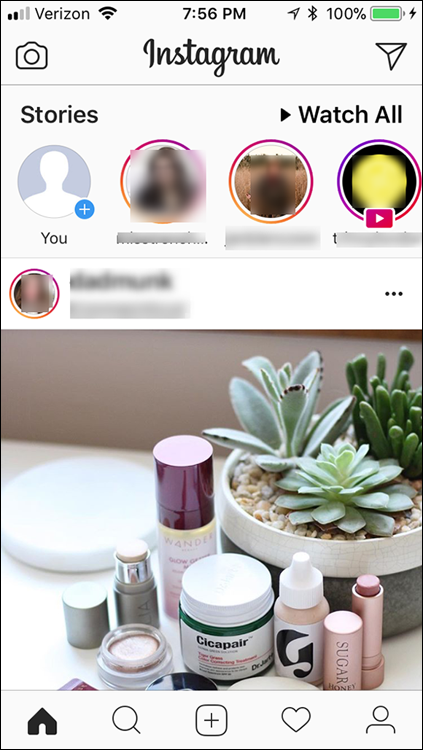
When you create Instastories, you should ask yourself two questions to get the maximum value from each story:
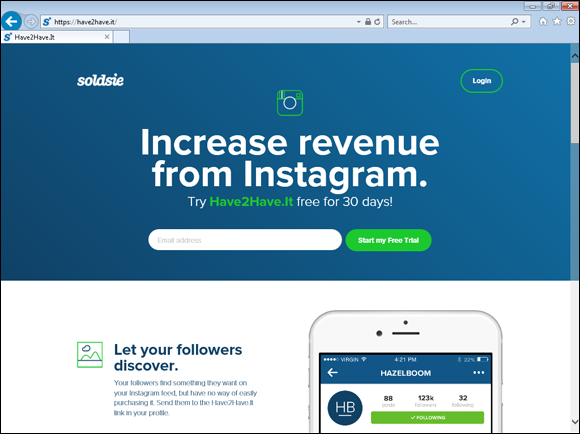
- How can you maximize shopping opportunities? You can now create ads directly in Instagram, so consider doing so as a viable option. You can also work with influencers, which are people who talk about your products to their large audiences. In addition, consider third-party tools such as Have2Have.it (
https://have2have.it/; see Figure 4-3) and Inselly (https://inselly.com/), among many others, that provide links to Instagram marketplaces, where you can sell the goods that you tag in your feed. For more about working with influencers, see Book 6. According to eMarketer, 71 percent of U.S. brands used Instagram as a marketing channel in 2017. They predict that this number will rise in the future. Instagram has shopping capabilities. Explore them to find additional revenue streams. - Which Instagram measurements will you look at to determine your success? From your Instagram account, you can track several measurements on Insights, including Impressions, Reach, profile visits, and website clicks. You can also track data on several other metrics based on where they came from, including Posts, Action on Page, and Stories. Checking these frequently is a good idea so that you can adjust and reach your overall goals.
To learn more about using Instagram for business, see Instagram For Business For Dummies, 2nd Edition, by Jennifer Herman, Eric Butow, and Corey Walker (Wiley).
Getting Inside Your Customers’ Heads
One last word on cross-promotion: To promote your Facebook presence in a way that truly makes sense, you need to identify the places where your customers and prospects hang out, as well as the websites they visit when they’re buying from your competitors.
You can develop a deeper understanding of these behaviors in at least three ways:
- Analyze the behavior of your current customers. Analyze the customers on your website, in your CRM (Customer Relationship Management) system, in your email list, and on your Facebook Page. Ask yourself where customers start and finish and where they are during each phase of the buying cycle (investigating, deciding, comparing, and purchasing).
- Spy on your competition. Find out what they’re doing by joining their email lists, following their activity on Facebook, and even buying their products or services.
- Test new approaches. Test and measure new ways to integrate your marketing channels with some of the ideas in this chapter.
Leave a Reply