Computer vision is a field of artificial intelligence that helps computers gain a high level of understanding from digital images or videos. It is done by acquiring images, processing them, analysing them and finally understanding the information they are conveying. If AI allows computers to think, computer vision helps them to see, observe and understand.
6.1 Human Vision vs Computer Vision
Computer vision works like human vision. The main advantage of human vision is that we have a brain that automatically learns to tell how far two objects are, whether they are moving or not, whether there is something wrong in an image and many more similar questions.
Computer vision techniques, in turn, train machines to perform these functions. The main challenge here is that machines have to analyse images coming from cameras using data and algorithms in a very limited time (refer Fig. 6.1). Once a system is trained to process thousands of images in a minute, it can quickly surpass human capabilities.
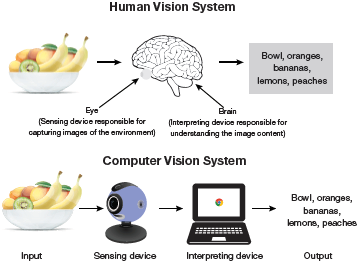
FIGURE 6.1 Human Vision vs Computer Vision
6.2 How Does Computer Vision Work?
Computer vision algorithms need large volume of data for analysing and recognizing images. For this, computer vision makes extensive use of deep learning (next level of machine learning) and Convolutional Neural Network (CNN).
Machine learning or deep learning algorithms help machines learn about the context of visual data and learn by itself how to identify and differentiate images. A CNN complements the machine learning or deep learning model by breaking images down into pixels that are given tags or labels. The CNN uses these labels to perform convolutions (a mathematical operation on two functions to produce a third function) to make predictions about what it is ‘seeing.’ Multiple iterations of the neural network are run and the accuracy of their predictions is evaluated. The process is repeated until the computer identifies the image with an acceptable accuracy. At this time, we say that the machine is recognizing or seeing images in a way similar to humans.
6.3 The Evolution of Computer Vision
Prior to deep learning/ machine learning, the performance of computer vision was very limited as a lot of manual coding and developer’s efforts were required. For example, facial recognition could be done using the following steps.
Create a database of individual images of all the subjects to be tracked. Store them in a specific format.
Annotate images by entering key points/features of every individual image. For example, distance between the eyes, the width of nose bridge, distance between upper-lip and nose, etc.
Capture new images and repeat the measurement process to mark the key points on the image.
All this work was done manually. Automation comes into picture with the application comparing the measurements in the new image with the ones already stored in its database. The application matches the images and tells whether it corresponded with any of the profiles it was tracking. In this scenario, there was very little automation as most of the work was still being done manually. No doubt, possibility of error was also large in this context.
Machine learning and then deep learning revolutionized the process of solving computer vision problems. Now, developers had to no longer manually code every single rule into their vision applications. Rather, programs were written to extract features to detect specific patterns in images and ultimately classify those images in different categories as illustrated in Fig. 6.2.
6.4 Tasks in Computer Vision
Computer vision applications recognize things in photographs by using the following techniques.
Object classification to identify the broad category of object in the photograph.
Object identification to classify the type of a given object is in the photograph.
Object verification to confirm the presence of object in the photograph.
Object localization to locate the objects in the photograph. The goal of localization is to find the location of a single object in an image. Usually, the located object is enclosed with a rectangular box. For example, in Fig. 6.3, the cat is first classified and then localized. The standard way to perform localization is to define a bounding box enclosing the object in the image.
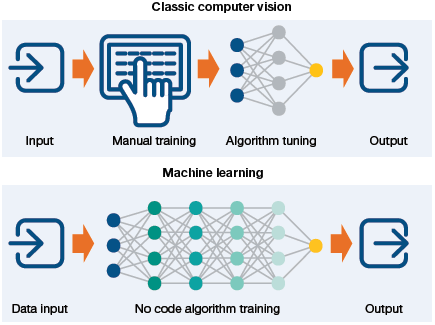
FIGURE 6.2 Classic Computer Vision vs ML Computer Vision
Object landmark detection to understand the key points for the object in the photograph.
Object detection or object identification task involves repeatedly locating and classifying all objects of interest in the image. The main aim here is to find and classify a variable number of objects in the given image.
Identifying unknown number of objects in a complex image is difficult for a human as some objects may be partially visible. These objects may be partly outside the frame, present in different sizes or may overlap each other. For example, object identification is extensively used to monitor real time images from security cameras to identify a specific person’s face.
Object segmentation to enumerate the pixels that belong to the object in the image. Instance or object segmentation not only finds objects in the image, but also creates a mask for each detected object that is as accurate as possible. It is extensively used by news channels to blur the face of a victim or any person whose identity is not to be revealed.
Object tracking inputs a video to track an object that is in motion over time. This is essentially useful in robotics (e.g., to stop a ball when a robot is used as a goalkeeper), in autonomous vehicles for spatial reasoning and path planning and in human tracking systems.
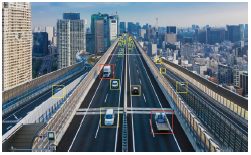
Credit: metamorworks / Shutterstock
FIGURE 6.3 Computer vision tasks
Object tracking applies object detection to capture the object being tracked and then discerns the movements of that object.
In addition, computer vision also includes methods for the following functions:
Video motion analysis to estimate the velocity of objects in a video, or the camera itself.
Scene reconstruction to create a 3D model of a scene inputted through images or video.
Image restoration uses machine learning-based filters to remove noise (to remove parts of image that are blurred).
To better realize the application of computer vision, play the game Emoji Scavenger Hunt.
6.5 How Computer Vision Works with Deep Learning?
With deep learning and CNN, the entire process of computer vision has been transformed. The following steps outline a general approach to building a computer vision model using CNNs.
Create a dataset of annotated images or use an existing one. Annotations include image classification, object detection (using bounding boxes), a pixel-wise instance segmentation of each object of interest present in the image.
From each image, extract features that are important for the current task. For example, extract facial features to recognize faces.
Train a deep learning model based on extracted features.
Evaluate the model using images that were not used in the training phase and compute the accuracy of the model.
This strategy comes under supervised machine learning technique as it requires a dataset from which the model can learn.
Leave a Reply