OpenCV is one of the most popular libraries providing functions for computer vision. The library has functions for the following tasks.
- Reading an image
- Extracting the RGB values of a pixel
- Extracting the region of interest (ROI)
- Resizing the image
- Rotating the image
- Drawing a rectangle
- Displaying text
With OpenCV, users can easily do complex tasks such as identifying and recognizing faces and objects, tracking moving objects, stitching images together to generate an entire scene with a high-resolution image, etc.
To install OpenCV on windows using pip command, just write the following command in Window’s Command Prompt.

Before using the OpenCV package, let us first discuss some important function that we will be using in this section.
The file should be in the working directory or we must give the full path to the image.
The imread() function accepts name of the image to open and a value 1 if the image has to be read as a coloured image. The syntax of this function can be given as follows:

Here, the path is a string representing path of the image to be read and flag specifies how the image should be read—0 for grayscale image and 1 for a coloured image.
The imread() either returns the image loaded from the specified path file (if the image is found), else returns a matrix.
Now, type the following programming in Python IDLE to read and process images using OpenCV.
Example: Reading and Processing an image
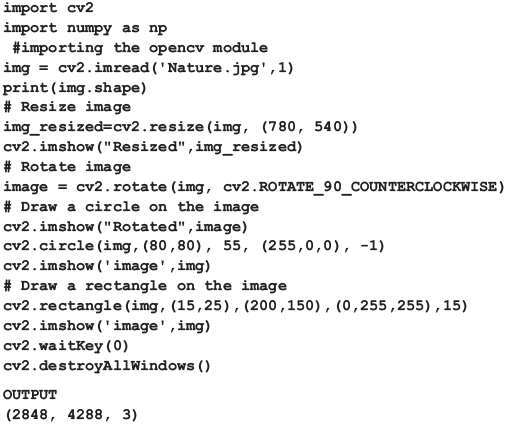
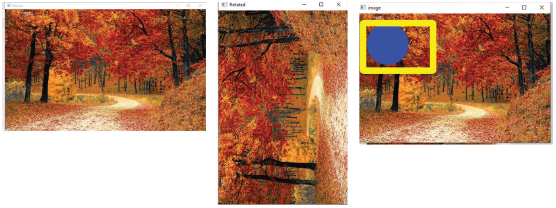
The resize() is used to change the size of the image. In ML algorithms, increase in number of pixels in an image increases the number of input nodes and thus the complexity of the model. The syntax of resize() is,

where,
s is the input image (required).
size is the desired size for the output image after resizing (required)
The cv2.rotate() method is used to rotate a 2D array in multiples of 90 degrees. The syntax of this method is,

src is the image to be rotated.
rotateCode specifies how to rotate the array. Its values can be cv2.ROTATE_90_CLOCKWISE, cv2.ROTATE_180, cv2.ROTATE_90_COUNTERCLOCKWISE.
The imwrite () function having syntax,

is used to save an image on a storage device in the specified location. The function returns a value (or status) indicating success or failure in saving the image. The code given below reads the image in file Nature.jpg and saves it in C:\ -> Users -> Chikki Folder

If the file is successfully written then this function returns True otherwise returns False.
Basic Operation on Images
In this section, we will discuss some basic operations that can be performed on the images. These are, Access pixel values and modify them. This can be done by writing
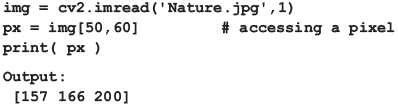
This prints a list containing 3 values that in turn specifies color of the pixel- Blue component, Green component and Red component. To modify the values, can access the pixel and then overwrite it with new value as shown below:
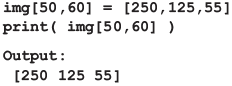
Access Image properties like the size (total number of pixels in the image), number of rows, columns, and channels. While shape() is used to print the number of rows, columns and colors, size() prints the size of the image.
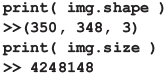
Image ROI (Region of interest) to select only a specific region of the image. For example, to detect eyes in an image, we need not search the entire image, we must concentrate only on face. Thus, here the face is our ROI.
Splitting and Merging Image Channels to split the channels from an image and then work on each channel separately or to merge the channels together.
OpenCV Drawing Functions
OpenCV has functions to allow users to draw certain shapes on an image such as circle, rectangle, ellipse, polylines, convex, etc. This is often used to highlight any object in the input image. For example, Facebook identifies face by drawing a rectangle around it.
Drawing circle: circle() is used to draw a circle in an image. Syntax of circle() is:

where,
image is the input image on which a circle is to be drawn.
center_coordinates specify the X and Y coordinate values representing the center of the circle.
radius is the radius of the circle.
color specifies the color of the border line of the circle.
thickness indicates the width of the circle border line in px.
Drawing Rectangle: We use the rectangle() to draw a rectangle on the image. Syntax of rectangle() is,

where,
image is the input image on which rectangle is to be drawn.
start_point specifies the top left vertex X and Y coordinates of the rectangle.
end_point indicates the bottom right vertex X and Y coordinates of the rectangle.
color specifies the color of the border line of the rectangle to be drawn (in the form of BGR).
thickness gives the width of the rectangle border line in px.
Drawing Lines: The line() is used to draw lines on an image. Its syntx can be given as,

where,
image is the input image on which line is to be drawn.
start_point specifies the starting coordinates (X and Y values) of the line.
end_point gives the ending coordinates (X and Y values) of the line.
Color indicates the color of the line to be drawn in the form of BGR)
thickness is the width of the line in px.
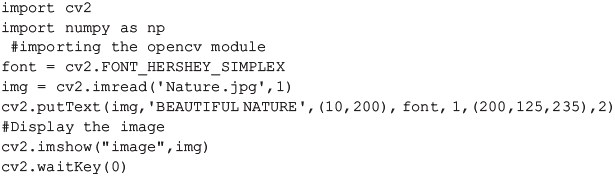
Write text on an image: Text can be written on an image by using the putText(). The syntax of this function can be given as,

where,
img represents the input image on which we have to write text
text is what we have to write on the image.
org denotes the Bottom-left corner of the text string on the image. Thus, org is used to set the location of text on the image
font specifies the font of text.
fontScale denotes the scale of the font by which size of the font can be increased or decreased.
color represents the color of the text in BGR form.
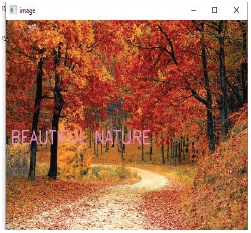
Example: Code given below places text on an image.
Canny Edge Detection: Edge detection is an image processing technique used to identify object’s boundaries within an image. In the code given below, we have used the Canny Edge Detection algorithm. Syntax of Canny() can be given as,

where,
img is the input image whose edges are to be detected.
minVal is the minimum intensity gradient
maxVal is the maximum intensity gradient
As per the syntax, edges with intensity gradient more than maxVal are definitely edges and those with intensity gradient less than minVal are sure to be non-edges and therefore discarded. Edges with values between maxVal and minVal are classified as edges or non-edges based on their connectivity with the ‘sure edges’. If the edges are connected to “sure-edges” then they are taken to be a part of the edges. Otherwise, they are treated as non-edges and discarded.
Example: Detecting Edges of an image.
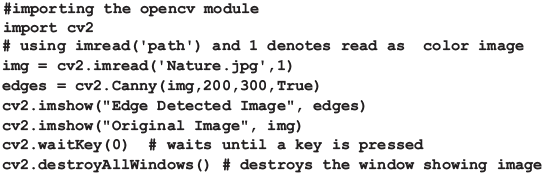
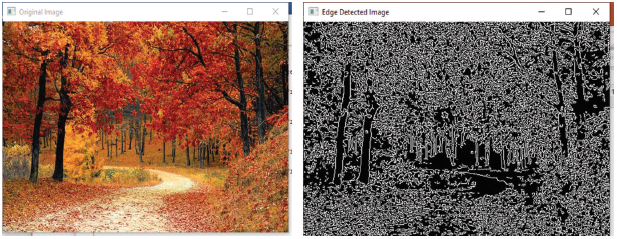
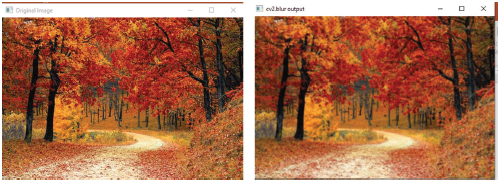
Image Smoothing is an image processing technique that removes noise from an image. For example, when blurring an image, low-intensity edges are removed. Blurring is often used to hide the details or any confidential information in an image. Different types of blurring techniques supported by OpenCV includes: averaging, median Blur, Gaussian Blur and Bilateral Filter.
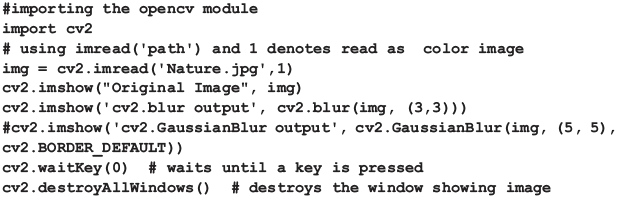
In the averaging technique, the image is normalized with a box filter. Average of all the pixels in the box area is calculated. The average value then replaces the value of the pixel at the center of the box filter. The cv2.bur() in OpenCV is used to perform this operation. It’s syntax can be given as,

where,
src specifies the image to be blurred.
Ksize represents the blurring box area.
median Blur technique calculates the median of all the pixels under the box area and replaces the value of the central pixel with this median value. medianBlur() provided in the OpenCV pakage is used to easily implement this kind of smoothing. Syntax of this function can be given as,

where,
src represents the input image.
dst represents the output image.
ksize represents the size of the kernel (box).
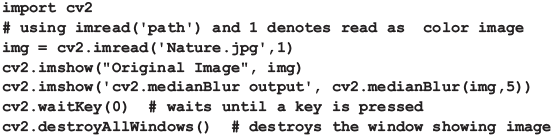
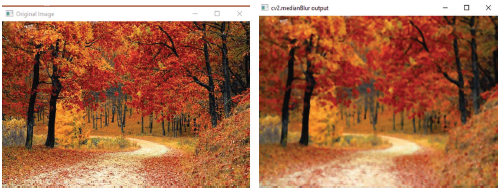
Gaussian Blur technique, instead of the box filter, a Gaussian function is used to blur the image. The width and height of the kernel window should be specified and these values should be positive and odd. Standard deviation in X and Y coordinates are also specified using the sigmaX and sigmaY parameters respectively. If sigmaX = sigmaY = 0, then they are calculated from the kernel size. The GaussianBlur() is used to implement this technique. Its syntax is,

src is the image to be blurred
dst is the output image of the same size and type as src.
ksize specifies the size of the kernel.
sigmaX and sigmaY are double values that represents standard deviation in X direction and Y direction respectively.
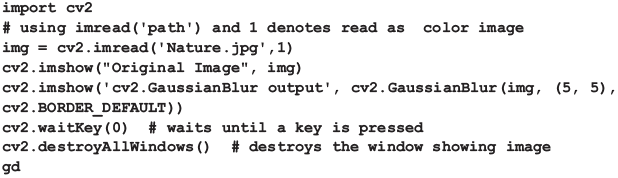
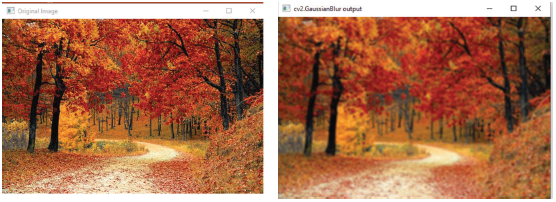
Bilateral Filter is a highly effective technique to remove noise but is slower compared to other filters. The problem with Gaussian filter is that it blurred the edges also which was not at all desirable. Bilateral filter blurs only the pixels with similar intensities to the central pixel thereby preserving the edges (pixels on edges have large intensity variation). It is implemented using the cv.bilateralFilter().
6.12 Immersive Experience
Immersive experience is any technology that extends reality or creates a new reality by leveraging the 360 space. While some types of immersive experience extend reality by overlaying digital images on a user’s environment, others create a new reality by completely immersing users in a digital environment, shutting them out from the rest of the world. This gives as more engaging or satisfying experience.
The Skyview app is an example of AR in action, allowing you to see where constellations are in the sky in real-time as you move your phone around.
The simplest tool to enjoy immersive content is through smartphones or specialized headsets. On the software side, although a web app or a desktop application can be used, web app is more popular.
To better understand the concept of virtual reality, just imagine how exciting it would be if you send your digital avatar to attend a meeting on your behalf. The avatar not only attends but also jots down the minutes, and reports to you after the session is over.
6.12.1 Elements of Immersion
An immersive experience is defined as a multi-sensory experience (sight, sound, touch and scent) across a journey, or a task that is contextually relevant to create intuitive and emotional value for the user that drives a better relationship.
Sight VR headset blocks out the peripheral vision or use a wrap-around headset to enhance vision so that the attention of the wearer is focused on what is happening directly in front of him/her. On the contrary, AR uses headsets or smartphone displays to add virtual elements to the real world.
Sound VR headsets include sound-dampening headphones that force the wearer to focus on the sounds of the virtual world. AR on the other hand, provides sounds for whatever is taking place on the screen.
Touch VR accessories provide haptic feedback for the wearer. Moreover, effects like vibrations and rumbles are used to synchronize with the virtual world. AR, however, does not need touch to increase immersion.
Thus, all these elements together create an immersive experience.
True immersion depends on a suspension of disbelief and a willingness to be transported to a different world.
6.12.2 Types of Immersive Experiences
360-degree content is an interactive photo or a video recording shot in every direction at the same time. This allows users to change the viewing direction at any moment. Digital twin is a precise virtual model of a real-life object, process or system. We can even create a digital of an object that does not even exist. Such models can be used to display textual details or to monitor, control and run simulations.
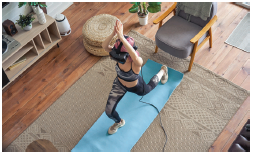
Credit: insta_photos / Shutterstock
FIGURE 6.23 Immersive Experiences
Technically, 360° content integrates two or more videos in a dome-like space. These videos are shot from all possible angles, with 2D instructional content overlaid on top of them. This technology is extensively being used to walk customers through a detailed range of product features and benefits. This helps users to get a wide-eyed version of the product in the real world. Similarly, 360° content is being used in travel and tourism industry to help tourists pre-visit a particular destination.
Virtual reality (VR) is a computer simulation that immerses the user inside a virtual world and allows him to interact with the environment. VR stimulates user’s senses to make him feel as if he was actually there in that environment.
PwC predicts that VR and AR could add $1.8 trillion to the global economy by 2030.
VR shuts a user completely from the rest of the world while being surrounded by content. Through a head mounted display (HMD), whatever content the user experiences in the headset becomes the reality for him.
360 vs 360 VR: Though the two terms are same, 360 VR is a combination of 360 content with VR mode (refer Fig. 6.23). It allows users to view the 360 contents in a cardboard headset, or sometimes even a mobile 360 VR headset. Users can experience 360 contents without the help of an HMD and is best experienced on mobile.
Mobile VR leverages HMDs that are connected to smartphones. Examples of these are the Samsung Gear VR,_ Google’s Daydream or even Google Cardboard.
True VR uses headsets with powerful computers or consoles. Examples include HTC Vive, Oculus Rift, Playstation VR, etc. These powerful HMDs use sensors (separate from the HMD) to keep a track of a person’s movement and his surroundings. The sensors would then adjust the VR content to whatever is within a user’s environment. True VR uses CGI and 3D modelling for content.
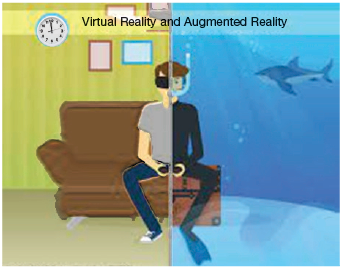
360 VR vs In-VR: With 360 VR, users can use their device to explore content by looking in any direction but not change the content that surrounds the objects. In-VR content takes depth into consideration. This means that when a person is viewing an object, he can move closer to the object or move further away from it. The entire content is adjusted accordingly.
Augmented reality (AR) enhances the user’s perception of the real world by adding a computer-simulated layer of information on top of it (refer Fig. 6.24). While AR adds or hides data from the environment, VR completely replaces the user’s perception of the real world.
Using AR, digital images are presented on top of the real world. This means that users who leverage AR are not completely shut off from the world. Instead, AR extends their reality.
For example, Snapchat Filters that overlay digital images onto your face is an application of AR. Another example of AR is Pokemon Go where users can walk around with their mobile phones and find Pokemons that are overlaid on the environment around the user.
Many stores like Target and Ikea have their own AR apps where users can choose a product and place it virtually on anything to see how it looks. For example, you can choose a dress and see how it looks on you. This allows consumers to ‘try out’ a product before even buying it.
AR also provides the ability to ‘touch’ the product. Some examples are as follows:
- BMW gives its users a chance to try out 3D models of their cars.
- Burger King used the motto ‘Burn That Ad’ in its advertising campaign in Brazil. In this campaign, the user is asked to scan any competitor’s ad and ‘burn’ it by using augmented reality. The most active users are then rewarded with a free branded whopper.
TABLE 6.2 Differences between augmented reality and virtual reality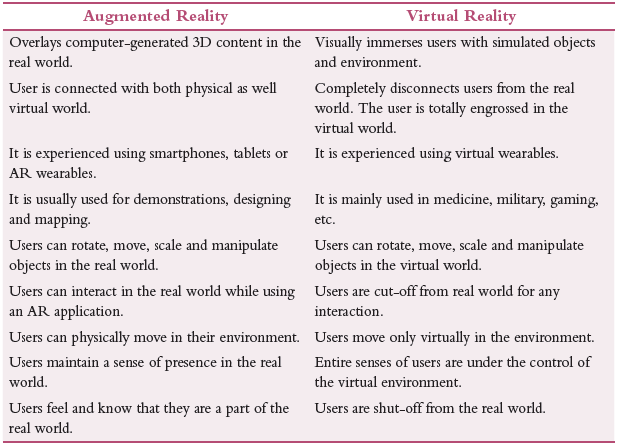
Mixed Reality (MR) brings together VR and AR into an enhanced version of AR. Mixed reality is also referred to as AR 2.0 because it achieves better immersion than AR. MR integrates virtual objects in the real world. It responds to changes in the environment and to user interaction in real-time.
Unlike VR, MR does not shut out users from the rest of the world. Instead, the Head Mounted Display (HMD) is more like a pair of glasses that overlays digital images on top of your environment (just like AR). Mixed reality is extensively being used for commercial, developmental and entertainment purposes, for the following:
- Conducting simulation-based training especially military training without increased risks.
- Creating an interactive environment with the full inclusion of virtual objects in reality.
For example, Disney World uses a combination of AR/MR to create a game to entertain park visitors while they walk around and wait in line for physical attractions.
Extended reality (ER) is used to enhance or completely replace reality. It is an umbrella term for every immersive technology including augmented reality, virtual reality, mixed reality, digital twins, etc. This technology extends reality by adding digital counterparts in the form of inscriptions, videos or animations.
ER is usually used for training employees, giving a walk through a live hologram of a product to understand its features.
Digital Twins: They are near-exact virtual models of real-life objects, processes or systems. This technology is usually used in manufacturing or engineering to simulate physical things either for optimizing or for studying how they behave before actually building them.
Accenture uses full-scale XR to create highly personalized experiences for its clients through sight, touch and sound.
For example, NASA uses digital twins to monitor and optimize satellites in space from the ground. Digital twins of satellites help scientists to foresee potential dangers, fuel shortage, engine power, steering power and other parameters of any spacecraft mission.
Mercedes uses this technology to optimize the performance of its F1 cars. Digital twin is also extensively used in healthcare and for digitally recreating entire cities. Therefore, a digital twin represents a ‘carbon-copy’ of a real-life component, structure or process which can be easily tracked in real-time. Digital twin technology combined with 3D-modelling techniques helps users to actively interact with the environment.
Advantages
- Digital twins are used for quality assurance tasks.
- It provides quick insights into a product anytime, anywhere for faster decision making.
- It helps to visualize defects in the real-time performance of certain equipment.
- It troubleshoots machines at remote locations.
6.12.3 Applications of Immersive Experiences
Immersive technology is not a new term for those who read Sci-Fi books or watch in Sci-Fi movies.
Business: Every business generates a number of reports using ERP software. These reports are, at times, difficult to understand. In such a case, an AR headset is used which will see only the most important bits of data in the report. The headset will show all the details when the user looks at specific parts of the report.
Using a VR headset can make remote business meetings through tele or video conferencing more authentic.
E-commerce uses 360-degree technologies to provide better visualization. It allows users to look at the product from every possible angle. Many websites have made the 360-degree content even more interactive. It can react to changes in options in real time, giving the user an immediate preview.
These websites are even using MR to show how the product will look like in a real-life environment.
Architecture and design are indeed extensively using immersive technology. With VR, we can explore building designs in a 1:1 scale. AR is used to show additional relevant information. MR allows users to edit 3D models created by them as per user’s requirements. Any small changes and adjustments in the simulation are reflected instantly.
Engineering, maintenance and repair of complex equipment are easily done using immersive techniques. While repairing, engineers use AR headsets to get useful data right away. Artificial intelligence can help them by giving suggestions about the next best action that can be taken.
In the design phase, a digital twin is used by engineers to see their creations in a virtual environment. They no longer need to build prototypes. Similarly, during testing phase, a digital twin can be used for running simulations and collecting analytical data.
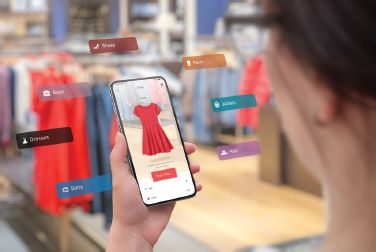
Credit: Stanisic Vladimir / Shutterstock
Healthcare is another area that extensively uses immersive experiences. Augmented and virtual reality both can make the current state of medical training more effective. While AR provides useful information to healthcare employees when learning how to use new equipment, VR can help them to practice more complex medical procedures in a virtual environment before actually performing them on a live patient.
Similarly, in radiology, AR is used during pathological tests to study medical procedures and evaluations. By virtually mapping the X-ray data of a patient, radiologists can identify abnormalities of bones and classify the disease more quickly than before.
Telemedicine uses VR or MR to break the distance barriers between patients and practitioners. Patients can now get themselves diagnosed in a more comfortable setting and having more accessible medical services. An AR headset can be used to give important information to every patient in a hospital, keeping their mind busy and divert it from all worries.
Even VR solutions are used to reduce anxiety in patients, helping them with sleep or just serve as a positive distraction. AR can be used to visualize patient data and treatment assistance. An AR headset can show only the relevant information directly on the patient’s body or give suggestions regarding the medicine to be prescribed. Moreover, during surgeries, immersive technologies can be used to outline the most optimal cutting path, give warnings about potential problems and help with additional information.
The travel industry is using immersive technologies for selling real-life experiences. For example, 360-degree content and VR provide customers with the option to try before they buy something. Customers can have a virtual tour of the place whether they intend to go, virtually walk around the hotel they intend to book. This will ensure them that they are making the right choice. AR headset can serve as a 24 × 7 personal tour guide that provides additional information in real time, making sightseeing easier and more informative, finding cafes, restaurants, hotels, inns and landmarks.
Real estate uses immersive technologies to virtually show the property that has to be taken on rent or for sale. It is very inconvenient and time consuming for the buyer as well as the seller to see every property. Buyers can check out properties remotely whenever they have time; that too without the help of a real estate agent. Later, they can personally visit only selected properties and use an MR headset to get information about the property, decoration options or furnishing suggestions.
DHL could cut 25% cost by using AR in their logistic business. Automaker Volvo uses VR headsets in the testing process and BMW uses it for workstation planning.
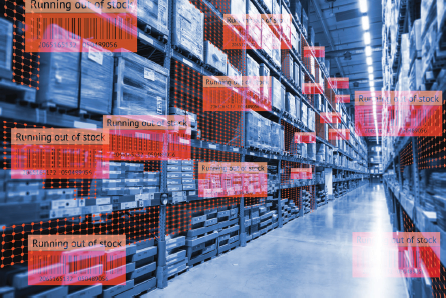
Augmented reality in logistic centres uses immersive technology to reduce warehouse costs by using AR smart glasses in the picking process. The smart glasses show a list of stuff to be picked (reducing lookup times) and calculate an optimal route (to lower travel time). Headset are used to read barcodes and determines if the current location is the right one. In case the location is not correct, the headset guides the workers to the correct location.
Automakers are using MR for testing automobiles in simulated extreme situations. Sensors in headsets enable precise measurement of reaction times and other important safety factors. VR is also used in workstation planning to reduce the labour force required and assess processes completely virtually. AR headsets can be used by employees for engine assembly units training at a faster pace (approximately three times faster).
While teaching about planet Mars, teachers can use MR to give a virtual tour to mars to explore its surface.
The car industry is also using immersive technology to create virtual showrooms where consumers can look at cars, take virtual test drives and even virtually sit in actual car seats.
At McLaren, VR software is used to design car models. A live hologram of the car is made which designers can alter. Even Volvo engineers use VR software to simulate drive trials and customize designs accordingly.
Companies like Adidas use VR to enhance workflow by using VR as a virtual team collaboration space. They use it when different teams have to work together. VR gives employees the ability to be in the same virtual room and share 3D models and other content.
Walmart is using VR headsets for training employees. They use immersive experience to prepare their employees for different real-life situations.
Education: VR can help students to learn about a particular concept. For example, a VR headset can be used to take a virtual tour of a historical monument and learn about historical events of importance associated with it. Similarly, MR can be used to learn about human body and how each part functions by overlaying digital images on an actual person and highlighting where the different parts are located.
Gaming is among the first applications that extensively used immersive technology. The launch of Playstation VR, Pokemon Go and VR arcades are examples of application of this technology. Table 6.3 list some games and the underlying technology they use.
TABLE 6.3 Games using Immersive Experiences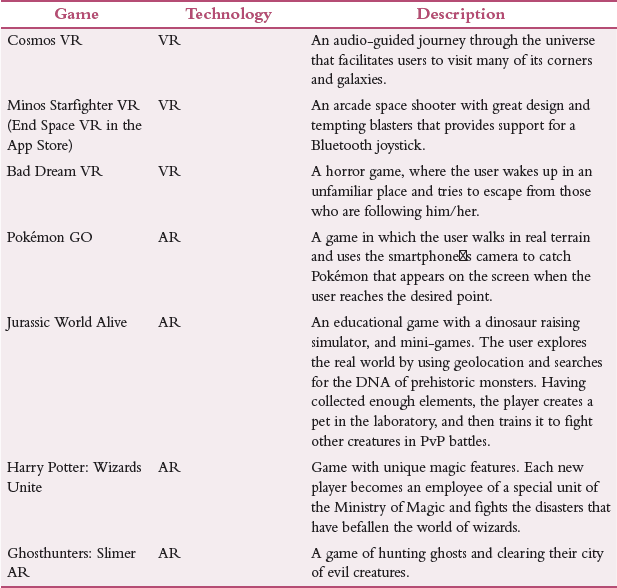
Immersive storytelling and virtual try-on: AR places users in the centre of the story, captures their attention or showcases products right on their faces. For example, cosmetic brands like L’Oreal and Maybelline allow consumers to apply virtual makeup to boost sales among Gen Z. Similarly, Turkish Airlines has created a branded filter on Instagram called ‘Turkish Airlines My Dream Destination Project’ that immerses people into virtual travels during the pandemic.
Designers combine traditional 2D CAD applications with VR tools to perfect their designs. Examples include softwares like V-Ray or SketchUp.
Aviation Management: Immersive technology allows flight engineers and ground handlers to identify, probe and analyse the situation before the aircraft takes off. This helps the crew to perform aircraft maintenance and engineering checks from a remote location. AR/VR headsets put teams on airside so that they can interact with aircraft holograms to conduct visual inspections or cargo inspections.
Supply chain and logistics: VR reduces logistic costs by providing virtual-navigation routes for the pickup of goods. This not only increases efficiency of the employees but also expedites the logistics process (refer Fig. 6.26).
MR devices support professionals working in supply chain by superimposing routes over truck windshields. Similarly, AR devices help by notifying teams when supplies perish.
Credit: Zapp2Photo / Shutterstock
FIGURE 6.26 Using Immersive Experiences for Handling Logistics
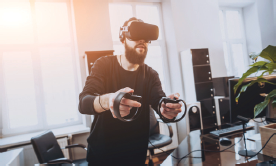
Entertainment sector: These days, especially after the outbreak of COVID-19, many events are conducted virtually. Immersive technology compensated for the lack of physical presence. Immersive devices help users to experience a concert or movie as if he/she are a part of it (refer Fig. 6.27).
Commercial businesses using immersive experience right now include the following:
DHL logistic centre uses integrated AR smart glasses in the packing process to reduce lookup time, optimize navigational routes and guide the worker to the correct location.
Credit: Roman Zaiets / Shutterstock
FIGURE 6.27 Immersive Experiences for Entertainment
BMW uses AR headsets for workstation planning to enhance productivity, assess processes and foster training of engine units.
Adidas uses AR for imparting virtual employee training. 360° content is used to prepare employees for real-life situations (e.g., a Black Friday sale simulation).
Autodesk Revit Live and Iris VR provide immersive architectural and building visualizations to help clients visualize buildings even before starting with the construction phase.
6.12.4 Virtual Reality Systems
Virtual reality is a complete artificial world that does not exist at all. Users ‘immerse themselves’ into this non-existent environment not only as an observer but also as a participant. VR devices are used to move around and manipulate objects virtually. Some common characteristics of VR systems are as follows:
Real-time simulation. The VR system provides picture sound, and other sensations (if any) in response to the actions performed, instantly, without noticeable delays.
Realistic imitation of the user’s environment. To give an illusion of real-world to fully immerse the user in the world of virtual reality, the system should display virtual objects with realistic effects.
Multi-user mode. VR systems facilitates collaborative work by multiple users simultaneously.
Interactivity. The virtual world must work based on user’s interaction with virtual objects. Here, the user is not just an extremely active observer but can also move, manipulate objects, look in different directions and perform other actions.
VR can be experienced through mobile devices. In 2014, Google invented that allows an immersive experience through a smartphone screen.
Some companies that have successfully used VR are as follows:
- The Teleporter 4D launched by the Marriott hotel chain in 2014 provides virtual reality booths that take the user on an introductory tour of one of the cities. The booth also simulated the climatic conditions of the selected city.
- Lexus facilitates users to take a virtual test drive of one of its latest models. The user just needs a smartphone and Google Cardboard.
- Samsung introduced the ‘Be Fearless’ programme in 2016 to help users overcome their fears. Participants took a course using Samsung Gear VR to check if they are able to deal with stressful situations in virtual reality so that if they land up in a similar situation in real life, they can handle them in a better way without any phobia.
- McDonald’s introduced a new packaging for Happy Meal, which can be transformed into virtual reality glasses.
Advantages of VR
- VR provides diverse types of instant data.
- It presents images from multiple viewpoints.
- VR demonstrates non-visible data to the user (like in geochemistry).
- Facilitates users to ‘visit’ the places normally inaccessible to individuals.
- VR provides an experience which can be recreated anytime.
Leave a Reply