Mobile marketing can be defined as any type of marketing or brand engagement that is consumed on a mobile device. This may seem simple, but it can actually be a bit wide‐ranging because embedded in the concept is the idea that you as a marketer will “know” how or where your digital marketing message will be consumed and engaged with, which is not always the case. Sometimes you don’t know. That is what makes it tricky! So in truth, mobile marketing can focus on marketing that is specifically designed for mobile devices but is often consumed across multiple digital devices and often involves adapting marketing messages that were designed to be consumed on much bigger devices, like computers, laptops, or TVs, to work well on mobile devices.
While the growth and evolution of mobile phone technology may now be slowing to some degree, there is still a lot of innovation happening as more and more nontraditional devices are connected to the Internet to become part of the Internet of Things (IoT). IoT refers to the increasing number of industrial and commercial items that can now be digitally controlled via the Internet, Bluetooth, or other wireless technologies. Controls for these devices generally come in the form of websites, mobile apps, or voice controls. Devices include connected security cameras, doorbells, thermostats, digital assistants, and speakers where consumers may receive digital communication. While these devices are often stationary and, thus, might not immediately be considered mobile, IoT devices are most frequently set up and controlled via mobile apps and websites and, thus, act as an extension of the smartphone. This will likely be where the mobile marketing innovation of the future happens, and it should not be ignored.
With the inclusion of IoT, you can see that the definition of mobile marketing can be wide‐ranging, so it is useful to start by breaking down all the different kinds of devices and technologies that are included in mobile marketing. Most of these topics can be best understood in the context of each other, and since many of the terms are commonly used and understood, we will not dwell on the precise definitions but instead will focus on the larger concepts of how all of these technologies fit together. The following table provides a basic breakdown and the subsequent sections address each set of technologies as a group:
| Mobile Devices | Mobile Operating Systems | Mobile Connectivity | Mobile Marketing Communication | Mobile Marketing Assets |
|---|---|---|---|---|
| Feature Phone Smartphone Tablet Connected Home Device IoT Devices Digital Assistants | iOS/iPhone Android Windows Other* | CDMA GSM EDGE LTE 2G/3G/4G/5G WiFi Bluetooth Casting | SMS MMS NFC Push Notification Digital Assistant Chatbot | Mobile Website Native Application/App Web Application/App Progressive Web App Widget Mobile Ads |
Mobile Devices
Mobile devices generally include smartphones and tablets, but it can also include a wide range of connected home and IoT devices. You can think of feature phones as the first generation of mobile phones, including some that were connected to the Internet, but not in any kind of sophisticated way. Feature phones were often flip‐phones and worked only with button‐pushes, often on the traditional qwerty keyboard rather than a touchscreen, with nearly no ability to shop or add new apps from app stores. The main method of mobile marketing to these devices was with text messaging. Feature phones that could access information from the Internet did it with a very limited browser that often focused on text and static images and struggled with more sophisticated code and designs.
The next level up in sophistication of mobile devices is the smartphone. The main thing that makes a smartphone different from a feature phone is that it has a much higher level of capability, including the ability to access the Internet in a more capable browser and to download apps from app stores. Smartphones generally have high‐resolution touchscreens that allow users to interact with websites and apps in a more user‐friendly, intuitive way. Tablets are similar and are generally used like a larger version of a smartphone, but they don’t have the ability to place traditional cell phone calls over a mobile network (they often can make calls over an Internet‐enabled calling app).
The last group of mobile devices is connected home devices, IoT devices, and digital assistants. These are different from the other mobile devices because they are often less mobile; they are not meant to move around with the user, like a phone or a tablet, but instead, are meant to interact with the user through applications on the phone. Devices can include Google Home, Nest Thermostat, Ring doorbells and other WiFi‐enabled security cameras, Amazon Echo and other Alexa devices, and a growing list of similar types of devices. In most cases, these devices are connected to a local WiFi network and are controlled either by voice commands, by a mobile app, or both. In some cases, these devices will include a visual touchscreen, but it is not required. In many ways, these devices act as extensions of the capability of the mobile devices that they are connected to.
Mobile Operating Systems
An operating system is simply the software that is loaded on a device that allows people to operate the device. All different types of technologies, including computers and modern cars, have operating systems, and so do mobile phones. In the world of mobile marketing, the main operating systems that we work with are called iOS for iPhone devices and Android for most other mobile phones, including phones that are not made by Google, the creator of Android. Apple has a closed system where only phones that they make can include their phone OS, but Google allows the Android OS to be used on mobile phones made by a variety of different manufacturers. There are other mobile phone operating systems, like Windows and the BlackBerry OS, but these are much less common, and the marketplace is now dominated by iOS and Android.
The most important thing to understand about operating systems is that they are generally not interoperable, meaning that software that is written for one OS will not work on a different OS. You might not think about phones using software, but mobile apps (mobile applications) are just a specific kind of software. This means that if you develop an app for Android devices, it will not work on iPhones. The two operating systems work differently with different code, and thus, the apps need to be developed separately, sometimes even by different development teams, because not all developers can code for iOS and Android. While there are some technical solutions that are striving to unify the code and the effort needed to make an app, they still require some separate effort, and the resulting software is often more buggy, limited, and problematic than code built specifically for each OS.
Not everyone knows this or understands it, including potential customers, so they may not understand when an app exists for one OS, but not the other. This is generally because most of the big, well‐known apps always release very similar apps for iOS and Android. Similarly, many consumers don’t have a clear understanding of the differences between app and web experiences, and since websites work natively on Android and iOS without extra effort, it can be difficult to clarify the distinction. As you can see in Figure 8.1, the populations in most countries are nearly evenly split between iOS and Android users, so these complexities make it best to build and launch iOS and Android versions of an app at the same time if possible, but to also have a web version of the app available so that potential customers don’t have to download an app to interact with your brand. Mobile applications are often described as native apps to differentiate them from web apps, because they have to be built to work natively on the operating system.
Mobile Connectivity
Having a basic understanding of mobile connectivity is especially important for mobile marketers when they are evaluating what types of technology will be most useful for their audience. Connectivity is all about how the devices send and receive information. The first generations of mobile data transfer were CDMA (Code Division Multiple Access) and GSM (Global System for Mobiles). The various carriers offered mobile data services using one or the other of these two bands. Some devices were built for one communication band or the other, and then some devices were “dual‐band” and could work on either. Now most phones are dual band. CDMA is more commonly associated with the United States and the Verizon network, but Worldwide CDMA only represents 20 percent of connections; the rest of the data connections are GSM. Verizon has transitioned their network to also support GSM. The main benefit of GSM over CDMA is that GSM allows you to simultaneously transmit data and have a voice call.
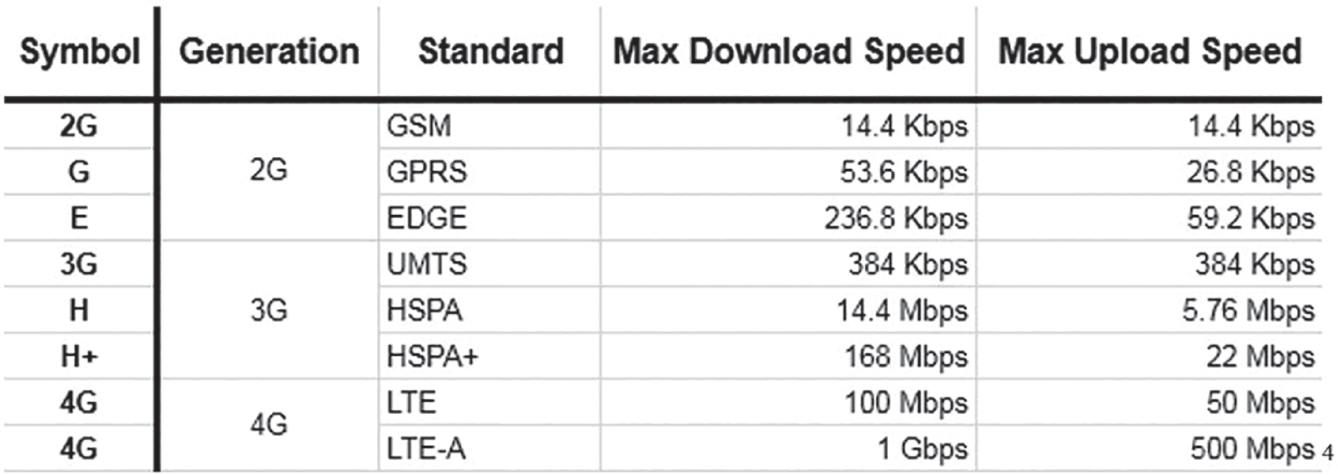
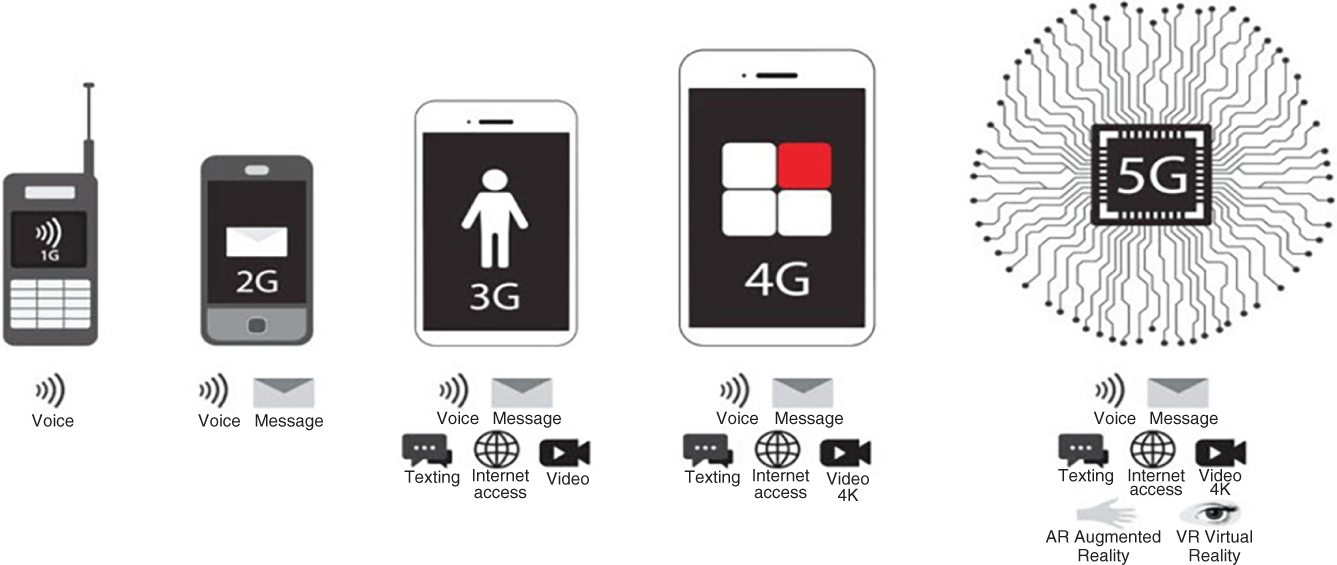
Mobile connectivity is often described in terms of its generations (Figure 8.2). The first generation of mobile connectivity, or 1G, included analog calling only, with no data. 2G, 3G, 4G, and 5G are all better levels of connectivity that represent multipliers of the speed and capability of the mobile connection and its ability to pass data. For example, 5G is about 100 times faster than 4G. There are sometimes subsets within the different numeric groupings. For instance, LTE, which stands for Long‐Term Evolution, is considered part of 4G but still relies on some analog radio transmission and some digital transmission of data, and it is slightly slower than regular 4G but faster than 3G. The chart in Figure 8.1 compares the different levels of connections.
In addition to mobile networks, smartphones can also use traditional WiFi signals to send and receive data, and in some cases, the WiFi is even used to make calls. 5G mobile data connections are sometimes referred to as fiber because they use fiber‐optic cables to help speed up the transmission of data. 5G and WiFi signals are comparable in terms of speed, but in general, 5G connections tend to be faster for upload and download than a low‐quality WiFi connection, like one that you might get in a public place, but 5G is not always better than a high‐quality WiFi connection that you might get at home or work. 5G has a longer range and a higher capacity than WiFi, so in the future it is expected to be the backbone of IoT communication, connected cities, connected cars, and other types of future IoT technologies.
According to Erickson’s research, it is expected that 5G mobile networks will carry 62 percent of the world’s smartphone traffic by 2027. WiFi will still be critical for the growing number of stationary connected devices in the home, such as doorbells, security cameras, connected speakers, gaming systems, app‐enabled TVs, and computers, and the two technologies will work together.
Like mobile connectivity, WiFi is also going through advancement, as the standard advances from 2.4Ghz to 5Ghz, which are both still common, but the next generation of WiFi will be WiFi 6, which “will deliver 4× higher capacity and 75 percent lower latency, offering nearly triple the speed of its predecessor, Wi‐Fi 5,” according to Intel.
Casting is a concept that is related to WiFi because it is a technology that allows one device to stream a constant signal to a separate device over WiFi connection. Chromecast, Amazon FireTV, and AppleTV all rely on or can use casting to send audio, video, or both to different devices, while also maintaining the controls of the streaming on the primary device rather than just the “receiving” device using native controls. Bluetooth connections are similar to casting but rely on a different type of connection. All of these technologies should be kept in mind when evaluating methods and technology for mobile marketing.
Mobile Marketing Communication
A few different communication technologies are common in mobile marketing. The two most obvious types of communication that are mobile‐specific are SMS and MMS communication and marketing. SMS (Short Messaging Service) is more commonly known as text messaging. MMS (Multimedia Messaging Services) is more commonly known as image messaging. Both can be used to communicate with potential customers in a similar but more abbreviated way than you might communicate in an email. This communication could be for announcing a sale or a special event or following up on a previous interaction, purchase, or behavior. These messages are generally short because of character limitations in SMS technology. Messages used to be limited to 140 characters, including spaces, but now most phones can accept more, through iMessage, the iOS messaging software, or Multimedia Messages, or MMS, which can include images, videos, and other attachments, much like email. Push notifications are similar in that they are short messages that are meant to drive engagement and re‐engagement, but they are initiated by native applications and websites rather than working independently like SMS and MMS.
The next, more sophisticated types of mobile‐oriented communication tools that can be used in mobile marketing are digital assistants and chatbots. These types of mobile methods of communication can include voice controls or text‐based communication. They are more commonly used as part of an engagement campaign designed to help potential customers understand, appreciate, or use the brand or the product offering. Chatbots and digital assistants often use language understanding technology and machine learning to determine what is needed or being requested by the customer and program a specific response to these needs. It is expected that these types of opportunities to interact with customers will grow by leaps and bounds because they are more deeply incorporated into IoT devices, which are likely to become more important aspects of a mobile marketing program.
Mobile Marketing Assets
When we talk about mobile marketing, the marketing that you design or promote will generally attempt to direct customers to a mobile‐friendly waypoint or destination that you build to work on the mobile device and use the communication methods that others build. You can choose to build a number of different types of mobile assets. Most often, that will be things like a native application (app) or a mobile‐friendly website, but it can also be less‐known variations of those assets, such as a web app, watch app, a progressive web app (PWA), a widget, a mobile banner, or text‐based mobile ad copy. Some of these assets, like apps and websites, can be for discovery and long‐term engagement, and others, like text‐based mobile ads and mobile banners, are just focused on the discovery and generally pass users over to an app or a website for longer‐term engagement. We get more into specific distinctions, along with the pros and cons of many of these assets, later in the chapter.
Leave a Reply