
To create a useful and effective website, any web-development exercise needs to develop a robust information architecture which can successfully integrate content, site design, organization of pages, and navigation to the best support their visitor’s interests. The first step towards that includes developing a master site diagram that helps plan the high-level scope of the site and also key details at each page level like navigation and information access.
According to Web Style Guide (3rd Edition) by Patrick J. Lynch and Sarah Horton, “site diagrams visualize the developing information hierarchy and help communicate organizational concepts to the team, stakeholders and project sponsors.” Typically, a site diagram evolves throughout the project with multiple iterations from different teams. A site diagram could be a plain hierarchical structure laying down key pages of the site or could be developed as a complex structure geared towards the technical team, which not only shows key site areas, but also provides an overview of the site directory and file structure (see Fig.7.1).
Jesse James Garrett, a renowned information architect, developed a widely used vocabulary for site diagrams, which has become an industry standard and is widely used for showcasing site structure, interactive relationships, and user decision points. The visual vocabulary elements of a mature site diagram, according to Web Style Guide, include:
- Content structure and organization: major site content divisions and subdivisions
- Logical functional grouping or structural relationships
- The ‘click depth’ of each level of the site: how many clicks are required to reach a given page?
- Page type or template (menu page, internal page, major section entry point, and so on)
- Site directory and file structure
- Dynamic data elements like databases, RSS, or applications
- Major navigation terms and controlled vocabularies
- Link relationships, internal and external to the site
- Levels of user access, log-ins required, or other restricted areas
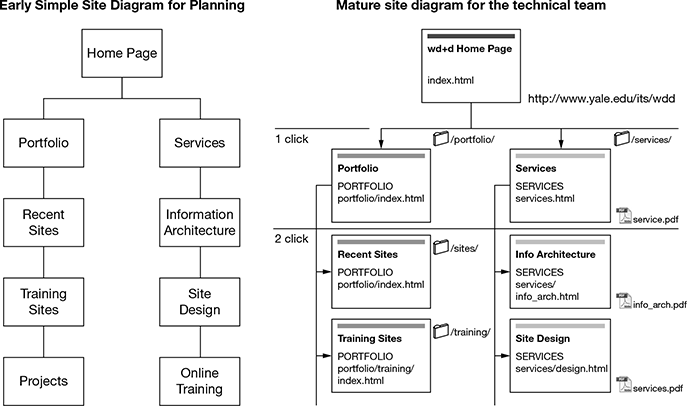
Figure 7.1 Examples of Early and Mature Site Diagrams
Wireframe Development
Wireframes typically are visual sketches, an approximate representation of how the areas of a web page would be organized. Site diagrams provide an overview of the developing site while wireframes are more of a rough map which are used by graphic and interface designer teams to develop page designs for the site. Example of a typical page wireframe is depicted in Fig. 7.2.
Wireframes at the beginning could even be just hand-drawn rough diagrams but they get refined. Experts can change and improve lots of elements depending on prior experience and research on the way visitors browse content sections visually, including eye-tracking studies, which give in-depth inputs on web page components and where users are likely to search for them.
Website Content Development and Management
Along with the creation of site diagrams and wireframe development, firms have to manage collation and development of relevant content to populate various site pages. The content for any website will largely be driven by the objectives of the site and interests of the audience who would be visiting the pages. Once the content is in place, it will go hand-in-hand in selecting the sections where specific content would be placed, depending upon its impact and relevance.
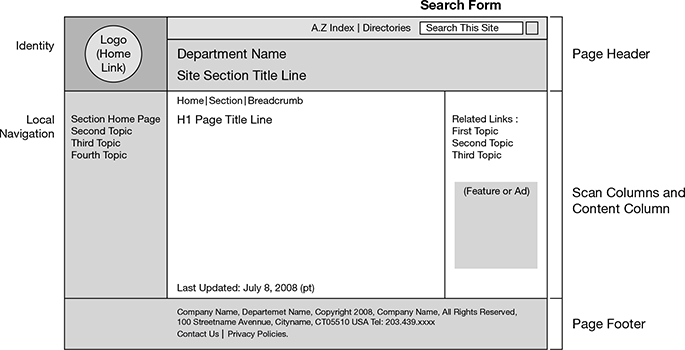
Figure 7.2 Typical Page Wireframe Diagram
Courtesy: Patrick J Lynch and Sara Horton, Web Style Guide 3rd Edition, http://webstyleguide.com, accessed on 27 February 2017, at 8.55 pm.
The key steps for defining and managing website content include:
- Understanding content expectations: The first step for developing web content includes understanding user goals and expectations from the site. Firms should pre-research the type of information which would get users most engaged and make them stay for the longest time on the site.
- Defining key content areas: As the next step, firms need to define and prioritize on key content areas to be given prime coverage and importance on the site.
- Analyzing content sources: Firms then need to dig into their archives and content across prior brochures, sales collaterals, etc., to see the content they already have and to then decide whether they need to develop their own content internally or have the website vendor develop content with inputs shared by the firm.
- Revising outdated content: An important part of content development is to identify and revise redundant content on the site and to update it with the latest product/service information.
- Developing content themes: involves bucketing different types of content across themes to be covered across the site. These themes or arrangement of similar topics, will help in site definition and navigation elements so that users see a natural flow in the website as they progress across the web pages.
- Mapping content themes to sitemap: involves developing content categories and placing content for different themes across site pages. A site page is a hierarchical diagram which shows multiple parent pages (top pages of the website) and child pages under each of them.
- Outlining navigation: The next stage, after mapping content to sitemap, involves placing each of the parent pages across their natural progression in the form of a navigation structure for users to follow.
- Labeling content: It involves providing accurate and meaningful labels to content areas. The labels should be easy to understand with simple words to avoid any confusion.
- Placing content on pages: This last stage involves placing requisite content pieces on specific web pages based on the wireframes developed earlier.
Leave a Reply