
You have the option to have a custom username for your brand’s page, which also serves as its custom URL. A recognizable username means better search engine optimization, and people are more likely to remember this name over an address featuring a lot of random numbers and letters.
To create your custom username, follow these steps:
- Navigate to your news feed and click the Create @Username link underneath your page’s name.The window shown in Figure 1-6 appears.
- Type your desired username into the box and click the blue Create Username button to finish.
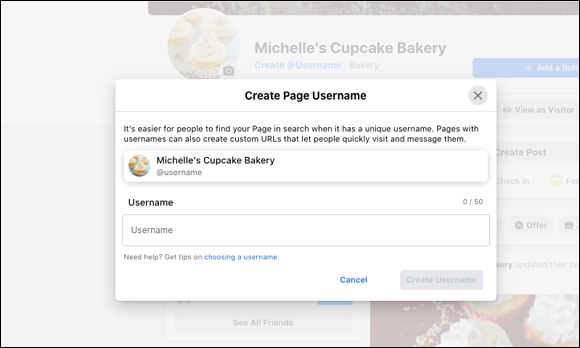 FIGURE 1-6: Choose your brand’s name for your custom username.If the username isn’t available, the Create Username button remains grayed out. If your chosen username is available, you’ll see a green check mark next to the username, and the Create Username button turns blue.You’re all set! Now people can find your page easier by just searching for your username or typing it directly into the browser bar — for example,
 https://www.facebook.com/MichellesCupcakeBakery.
It should go without saying that it’s a good idea to choose your brand name as your username. However, if your brand name is common, someone may have already beaten you to the punch. If that’s the case, see whether you can add another word to your brand name so that you still have that recognizability.
 You can change your username at any time by going to the Edit Page Info section in the left sidebar. We don’t recommend changing it too often, though. The whole idea of social media marketing is to build up a loyal following, and how can you do that if your existing followers keep losing you?
Leave a Reply